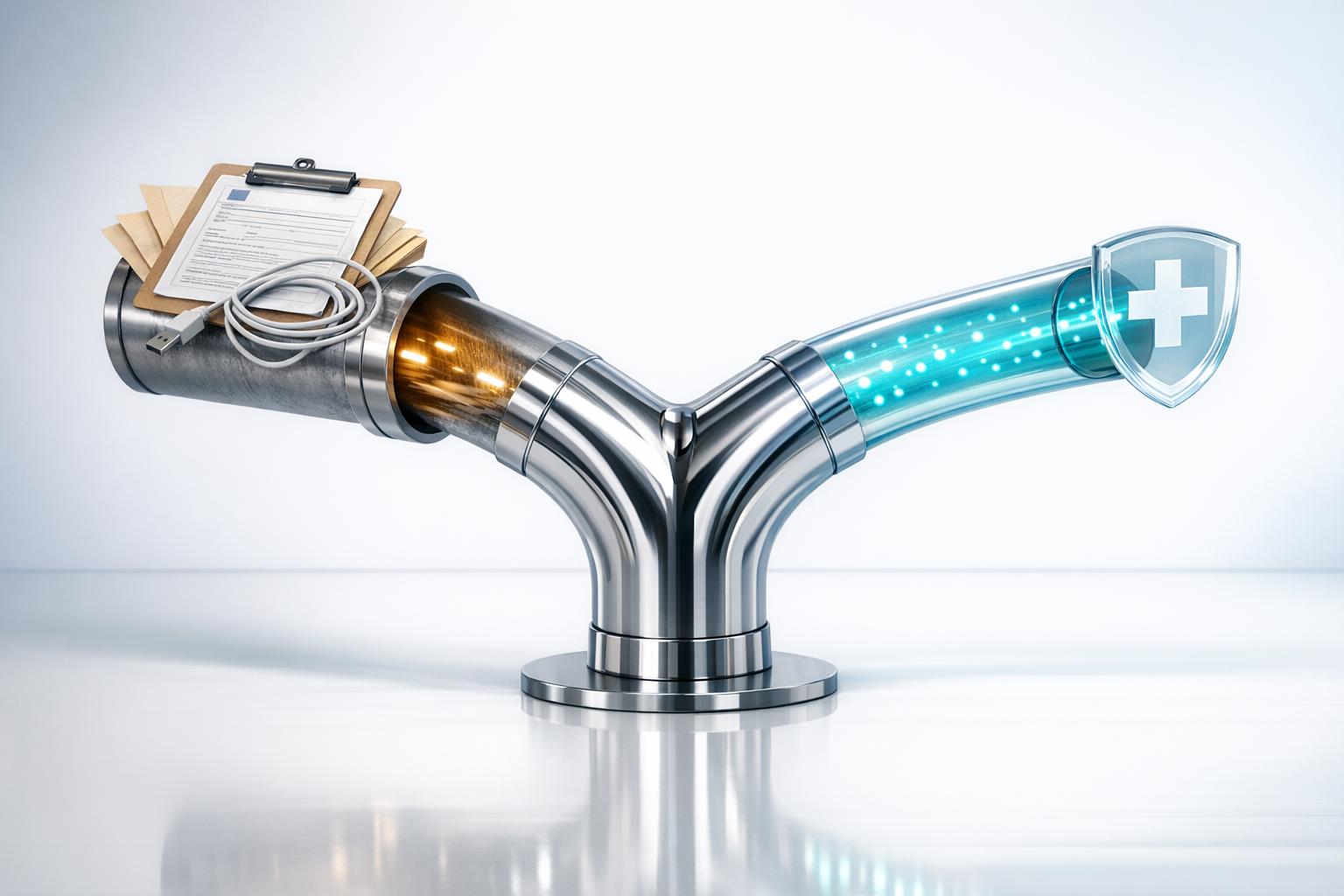
Manual vs. Automated HIPAA Data Transfers
Healthcare Technology
Updated Mar 27, 2026
Automation secures HIPAA data transfers, cuts errors and admin time, and lowers costs—manual methods suit only rare, low-risk cases.
HIPAA data transfers involve securely moving patient information between healthcare providers, insurers, and vendors. Organizations must choose between manual methods (like emails, USBs, or paper records) and automated systems (using encryption, APIs, and audit trails). Here's the key takeaway: manual processes are prone to errors, security risks, and inefficiencies, while automation ensures compliance, reduces workload, and enhances security.
Key Highlights:
Manual Transfers: Relies on human actions, increasing risks of breaches and errors. Common methods include emails, USB drives, and paper records.
Automated Transfers: Uses secure protocols (like SFTP) and software to encrypt, track, and log data movements in real-time.
Efficiency: Automation saves up to 73% of administrative time and reduces error rates from 22% to 2.1%.
Cost Impact: Manual compliance efforts cost $12,000+ annually for small organizations, while automation delivers a 19:1 ROI in some cases.
Quick Comparison:
Feature | Manual Transfers | Automated Transfers |
|---|---|---|
Encryption | Inconsistent, user-dependent | AES 256-bit encryption |
Compliance | Manual tracking, prone to gaps | Automated, tamper-proof audit logs |
Error Rate | High (e.g., 22%) | Low (e.g., 2.1%) |
Time Spent | ~40% of workday on documentation | ~15% of workday |
Cost Per Claim | $15–$25 | Significantly lower |
Bottom Line: Automation is the smarter choice for frequent, high-volume transfers, ensuring security and compliance while saving time and money. Manual methods may suffice for rare, low-risk tasks but carry higher risks overall.
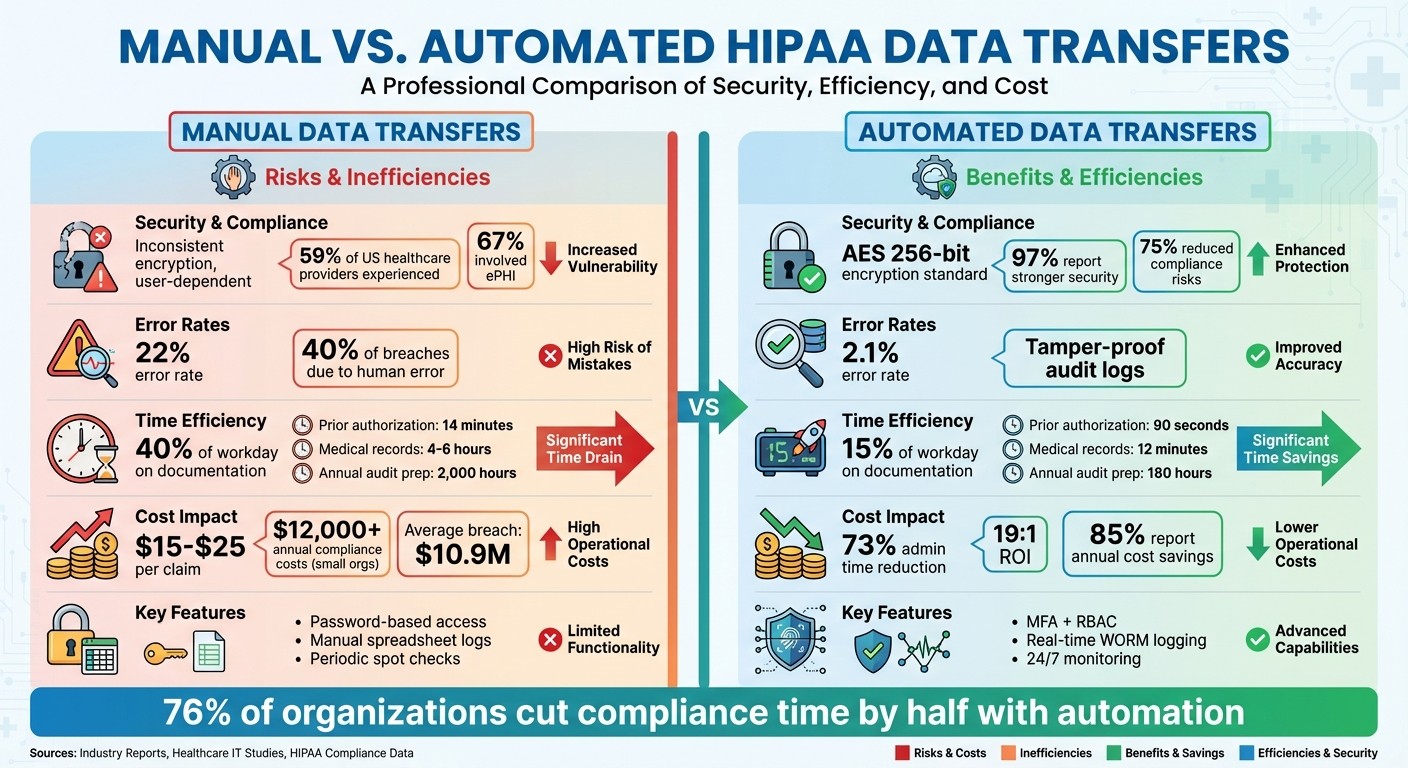
Manual vs Automated HIPAA Data Transfers: Key Differences in Security, Efficiency and Cost
Manual HIPAA Data Transfers
What Manual Data Transfers Include
Manual data transfers depend on human actions to move Protected Health Information (PHI) between parties. These methods include sending email attachments, traditional faxing, physically transporting paper records, or using portable storage devices like USB drives [2][4][5]. Each step requires staff to handle sensitive data repeatedly, increasing the chances of errors or breaches.
Healthcare organizations often stick with these methods because they’re familiar and don’t need specialized technical systems. For instance, a billing coordinator might email lab results to an insurance company, or a nurse might carry patient data on a USB drive between facilities. While convenient, these methods lack robust tracking or security features and rarely meet the digital audit trail requirements mandated by HIPAA [4].
Despite their simplicity, these manual processes come with serious security and compliance challenges, as outlined below.
Problems and Security Risks
Manual transfers create vulnerabilities that can compromise HIPAA compliance and erode patient trust. Standard email and consumer-grade file-sharing tools often lack end-to-end encryption, leaving sensitive data exposed during transmission [4]. On top of that, many of these services don’t sign Business Associate Agreements (BAAs), which is a direct violation of HIPAA [4][5].
The statistics are alarming. Between October 2009 and December 2023, the Department of Health and Human Services recorded nearly 6,000 large-scale healthcare data breaches [3]. In the U.S., 59% of healthcare providers have experienced data breaches, and 67% of those incidents involved electronic PHI [6]. The consequences can be devastating - Anthem, Inc. faced the largest HIPAA penalty to date, paying $16 million in 2020 [3].
Human error adds another layer of risk. Mistakes like emailing files to the wrong recipient, using weak passwords, or forgetting to encrypt documents are all too common [2]. IT expert Adam Bertram described it bluntly:
[Manual email transfer] is the digital equivalent of leaving patient files on a bench in the hospital lobby with a sticky note saying, 'For Billing - Please don't look if you're not Billing.' [7]
Physical media, like USB drives and paper records, bring their own challenges. These items are easily lost, stolen, or damaged by environmental factors [5]. Unlike managed digital solutions, physical media lack features like remote-wipe capabilities or built-in encryption [2][7]. Additionally, manual methods don’t generate the unalterable audit trails required by HIPAA, making it hard to track who accessed or shared sensitive information [2][3][4]. These gaps not only increase the risk of data breaches but also complicate compliance reviews.
Here’s a breakdown of the main security and compliance risks tied to different manual transfer methods:
Transfer Method | Security Limitation | HIPAA Compliance Risk |
|---|---|---|
Standard Email | No end-to-end encryption; no audit logs [4] | High; risk of interception and lack of BAA [4] |
Traditional Fax | Physical documents can be left unattended [4] | Moderate; requires strict physical safeguards [4] |
USB Drives | Easily lost or stolen; often unencrypted [2] | High; needs hardware encryption and strict inventory [2] |
Physical Paper | Prone to theft, loss, or damage [5] | High; difficult to maintain access logs [5] |
Consumer Cloud Apps | Providers often won’t sign a BAA [4] | High; violates Business Associate rules [4] |
Automated HIPAA Data Transfers
How Automated Transfers Work
Automated data transfers depend on secure protocols and specialized software to handle Protected Health Information (PHI). Tools like SFTP, FTPS, and API integrations play a key role in encrypting files, verifying user identities, and logging every step of the process automatically [6].
Managed File Transfer (MFT) systems streamline this process. They handle scheduling, apply AES-256 encryption to safeguard data both in transit and at rest, and generate compliance reports - all without needing manual input. For instance, if a lab result needs to be sent to a billing system, the MFT solution takes care of encrypting the file, verifying the recipient's credentials through Multi-factor Authentication (MFA), and securely delivering it - all while creating a comprehensive audit trail [3].
API integrations, particularly those using HL7 FHIR standards, allow for real-time data exchange. Unlike traditional batch processing that sends updates at the end of the day, APIs can instantly push changes as soon as a patient record is updated [9]. Middleware and ETL (Extract, Transform, Load) tools further help by connecting older healthcare systems with modern cloud platforms, ensuring PHI remains secure as it moves between different environments [6].
These systems also incorporate Role-Based Access Controls (RBAC), restricting data transfer capabilities to authorized personnel. Automated compliance checks ensure that the receiving system meets required security standards [8]. By replacing manual processes with consistent and repeatable automation, these technologies reduce errors and enhance data protection.
Advantages of Automation
Compared to manual processes, automated systems provide a higher level of security and reliability. One major benefit is the reduction of human error, which is responsible for nearly 40% of healthcare data breaches [9]. By automating file transfers, encryption, and access control, organizations minimize vulnerabilities tied to manual handling.
Automated systems also excel in creating detailed audit trails. These logs track every instance of file access, modification, and transfer, complete with timestamps and user information. Such centralized records make HIPAA compliance audits far simpler than dealing with fragmented manual logs.
Efficiency is another standout benefit. Automated workflows can complete repetitive tasks - like file encryption, verification, and routing - in seconds, whereas manual methods might take hours [6]. This speed is especially important as more healthcare providers adopt cloud-based transfer services. Since 2020, FHIR-based API usage has grown by over 300%, significantly improving interoperability and enabling real-time data sharing [9]. For example, APIs can accelerate medical billing and patient record updates compared to slower batch processes [6].
Advanced features like AI-powered monitoring add another layer of protection. These systems continuously scan for unusual activity and can instantly trigger alerts or lock down access if suspicious behavior is detected [6]. Additionally, robust encryption and accurate access logs can cut the financial impact of a data breach by as much as 35% [9].
Feature | SFTP/FTPS Role in HIPAA Compliance |
|---|---|
Encryption | Utilizes AES-256 and SSL/TLS to secure data at rest and in transit |
Authentication | Implements MFA and RBAC to verify user identity and control access |
Integrity | Ensures files are delivered intact using checksums and atomic operations |
Audit Logs | Automatically records all file activities for compliance purposes |
Automation | Reduces errors by scheduling transfers and auto-encrypting files |
HIPAA Compliant File Transfer
Manual vs. Automated: HIPAA Compliance Differences
When it comes to meeting HIPAA requirements, manual and automated data transfers operate in very different ways. Manual transfers rely heavily on users to handle encryption, verify processes, and document activities. This leaves room for inconsistencies and human error. On the other hand, automated systems enforce encryption, authentication, and logging consistently, removing much of the variability.
Here's a striking statistic: 97% of organizations using compliance automation reported spending less time on compliance tasks, with 76% cutting that time by at least half. Additionally, 75% noted fewer compliance risks [1]. These benefits come from automation's ability to enforce technical safeguards that manual methods often fail to maintain.
Take audit trails, for example. Manual systems often depend on spreadsheets, which can be incomplete or altered. In contrast, automated systems generate tamper-proof, real-time logs stored on Write-Once, Read-Many (WORM) storage. During a HIPAA audit, these logs provide immediate, reliable evidence. Manual records, however, often require piecing together fragmented information from various sources - an inefficient and risky process.
Authentication and access control highlight another key difference. Manual systems typically use basic password protection and static permission lists, which can become outdated as staff roles change. Automated workflows, however, implement Multi-Factor Authentication (MFA) and Role-Based Access Controls (RBAC). These systems dynamically adjust permissions and can instantly revoke access when needed, reducing the risk of "permission creep" - a common issue in manual setups.
The table below breaks down these compliance differences, providing a clear side-by-side comparison of manual versus automated data transfer features.
Compliance Features Comparison
Feature | Manual Data Transfers | Automated Data Transfers |
|---|---|---|
Encryption Standards | Inconsistent; relies on users to initiate encryption | AES 256-bit encryption for data at rest and in transit |
Authentication | Password-based; manual tracking of access lists | Multi-Factor Authentication (MFA) and secure user IDs |
Access Control | Static permissions; slow offboarding process | Role-Based Access Control (RBAC) with automated offboarding |
Audit Logs | Manual spreadsheet entries; difficult to verify | Real-time, tamper-proof (WORM) automated logging |
Transmission Security | High risk of sending data to the wrong recipient | End-to-end encryption with automated recipient verification |
Monitoring | Periodic manual spot checks | Continuous 24/7 monitoring with behavioral analytics |
Evidence Collection | Time-consuming manual gathering | Automated integration with the technology stack |
This comparison sets the stage for looking at how these differences impact efficiency and costs in manual versus automated systems.
Efficiency and Cost Comparison
Let’s dive into how automation dramatically improves efficiency and slashes costs when compared to manual HIPAA data transfer processes.
The difference in efficiency is striking. Manual processes eat up nearly 40% of a clinician's workday, mostly on documentation. That means less time for patient care. Automation, on the other hand, reduces that burden to just 15% [10]. Take prior authorization requests as an example: manually, they take about 14 minutes each. With automation? Just 90 seconds. Similarly, processing medical record requests manually takes 4–6 hours, but automation cuts it down to a mere 12 minutes. And when it comes to audit preparation, the time commitment drops from around 2,000 hours annually to just 180 hours [10].
"Your clinical staff is spending 40% of their time on documentation. That's not a staffing problem. That's an infrastructure problem that requires a systems-level intervention."
Time and Resource Savings
The impact of automation becomes even clearer through real-world examples. In February 2026, a 350-bed hospital in the Midwest rolled out a HIPAA-compliant automation system over 10 weeks. The results were impressive: they reclaimed 1,800 nursing hours every month for direct patient care, cut administrative time by 73%, and reduced HIPAA compliance incidents by 89%, thanks to automated redaction and monitoring [10].
The hospital also saw a dramatic improvement in claims processing accuracy. Error rates dropped from 22% with manual methods to just 2.1% using automation - nearly a tenfold improvement. Considering that administrative costs make up about 34% of healthcare spending (around $2.1 trillion annually), these efficiency gains translate into significant savings. Automation also eliminates the need for after-hours manual documentation, handling repetitive tasks like data entry, file validation, and evidence collection.
These time savings directly lead to lower operational costs, making automation a practical and impactful investment.
Cost Analysis
Automation doesn’t just save time - it also delivers serious financial benefits. Smaller healthcare organizations often spend at least $12,000 annually on manual compliance efforts, while larger entities can rack up costs in the hundreds of thousands [11]. Hiring external HIPAA consultants adds even more to the bill, with rates ranging from $200 to $350 per hour. Penetration testing costs can also vary widely, from $1,000 to $5,000 depending on the organization’s size [11].
Manual claims processing costs between $15 and $25 per claim, which adds up fast. In contrast, the aforementioned hospital invested $110,000 in its automation system and achieved an annual operational value of $2.1 million - a remarkable 19:1 return on investment in just the first year [10].
Then there are the hidden costs of manual processes. Issues like VPN connection failures, data corruption during FTP transfers, and technical debt from rushed workflows can lead to costly consequences. For instance, a single PHI breach in 2024 cost an average of $10.9 million, highlighting the financial risks tied to manual methods [10].
Cost Factor | Manual Transfers | Automated Transfers |
|---|---|---|
Processing Cost per Claim | $15–$25 [10] | Much lower (73% admin reduction) [10] |
Prior Authorization Time | 14 minutes [10] | 90 seconds [10] |
Medical Record Request | 4–6 hours [10] | 12 minutes [10] |
Annual Audit Preparation | ~2,000 hours [10] | ~180 hours [10] |
Claims Error Rate | 22% [10] | 2.1% [10] |
Clinician Documentation Time | 40% of workday [10] | 15% of workday [10] |
For healthcare organizations, automation isn’t just about cutting costs - it’s about freeing up clinical staff, reducing burnout, and enhancing compliance. It’s a powerful way to improve operations while focusing on what matters most: patient care.
Risks of Manual Transfers and How Automation Reduces Them
Manual HIPAA data transfers leave healthcare organizations vulnerable to serious security issues - vulnerabilities that automation can help address. Consider this: 59% of healthcare providers in the U.S. have experienced data breaches, and 67% of those breaches involved electronic patient health information (ePHI) [6]. Many of these breaches stem from preventable flaws in manual processes.
One of the biggest dangers tied to manual transfers is human error combined with weak technical safeguards. For instance, 71% of healthcare workers admit to using personal AI tools at work, which can lead directly to HIPAA violations when handling PHI [6]. Manual systems often rely on outdated technologies that lack modern protections. Without automated Role-Based Access Controls (RBAC), sensitive patient data can be accessed by unauthorized individuals. Additionally, lost or stolen devices pose another major risk, as they can lead to breaches if proper safeguards aren't in place.
Automation tackles these challenges directly. 97% of organizations using compliance automation report stronger security and compliance measures, and 75% see a reduced risk of non-compliance [1]. Automated systems enforce AES 256-bit encryption for data at rest and in transit, eliminating the inconsistencies of manual encryption. Features like multi-factor authentication and RBAC ensure that only authorized personnel access PHI, and real-time monitoring detects unusual activity quickly - addressing the blind spots inherent in manual processes.
"Automatic encryption removes this risk by ensuring that all PHI is consistently encrypted, providing reliable protection without relying on the user's vigilance or expertise."
Liyanda Tembani, HIPAA Compliance Specialist [13]
Automation also creates tamper-proof audit trails using WORM storage, which is critical for HIPAA audits. Fail-safe mechanisms block data transmission if encryption fails, preventing the accidental exposure of unencrypted PHI [13]. By addressing these security gaps, automation not only safeguards sensitive data but also streamlines operations. For healthcare organizations, automation shifts security from being a constant worry to a dependable, consistent solution.
How to Implement Automated Transfers for HIPAA Compliance
Getting Started with Automation
The first step in automating your processes while staying HIPAA-compliant is to sign a Business Associate Agreement (BAA) with any vendors handling Protected Health Information (PHI). This agreement ensures that the vendor is legally accountable for implementing the necessary HIPAA safeguards before handling any patient data [14].
Next, conduct a security risk assessment to identify where PHI enters, flows, and exits your system. This assessment helps you spot high-risk workflows - like email attachments or shared folders - that are prone to breaches and should be prioritized for automation [19].
Once you've chosen a HIPAA-compliant platform, focus on setting up strong encryption. Implement end-to-end AES 256-bit encryption and TLS 1.2 or higher for all data transfers [15][17]. Add layers of security with multi-factor authentication (MFA) and role-based access controls to ensure only authorized personnel can access PHI. Enable automated audit logs to track every transfer, documenting who accessed files, when, what actions were taken, and from which devices. Make sure these logs are immutable and stored for at least six years, as required by HIPAA [14].
To further streamline operations, integrate secure APIs with your existing systems like EHRs, CRMs, and scheduling software. This allows for direct and secure PHI transfers without manual intervention [18]. Before fully transitioning, validate these workflows in a controlled environment to ensure they function as intended [19].
Once your automated system is in place, you can use workflow automation tools to simplify PHI routing and reduce the need for manual handling.
Using Workflow Automation Tools
Workflow automation tools take your secure setup a step further by eliminating repetitive tasks and ensuring consistent compliance. These tools can automatically route incoming PHI to the right departments based on predefined rules, such as patient type or data category [18]. You can also schedule batch transfers to securely send files to partner organizations at specific times using protocols like SFTP, reducing staff workload and ensuring timely file exchanges [16].
For example, Lead Receipt integrates directly with CRMs and scheduling systems via secure APIs. Their AI-powered receptionist handles calls and lead intake 24/7, automatically routing patient information to the correct systems. By minimizing manual data entry, this approach reduces human errors and limits opportunities for unauthorized PHI access.
Additionally, automated systems often include data leak prevention (DLP) tools that scan files before transfer to confirm they contain only authorized data types [15]. These safeguards make compliance an ongoing, automated process, reducing the need for constant human monitoring or manual checks.
When to Use Manual vs. Automated Data Transfers
Choosing the right method for data transfers comes down to understanding your operational needs. Factors like data volume, transfer frequency, and available resources play a critical role in deciding between manual and automated processes. Aligning your method with your workflow ensures tasks are handled efficiently without unnecessary complexity or delays.
Data Volume is a major factor. If you're dealing with occasional, low-volume transfers - like sending a single patient record to a specialist - manual methods can work just fine, provided encryption and a Business Associate Agreement (BAA) are in place. On the other hand, high-volume transfers, such as large datasets or detailed medical records, demand automation. Automation helps enforce "minimum necessary" access standards and avoids bottlenecks in processing.
Transfer Frequency is another key consideration. Tasks that are repetitive and predictable, like daily batch downloads or ongoing patient communications, are ideal for automation. Automating these tasks saves time and minimizes errors. For example, if your team spends hours each month on repetitive data entry, automation can eliminate that workload while improving accuracy.
Error Risk grows with the complexity and volume of manual transfers. Issues like file corruption, version control problems, or missed encryption steps are more likely to occur. Automated systems tackle these challenges with built-in verification processes and real-time alerts.
The FTP protocol doesn't include built-in checksum verification, so a '226 Transfer complete' message only confirms that bytes were sent - not that they arrived intact [12].
How to Decide Which Method to Use
Start by auditing your current processes over a week. Identify bottlenecks and high-frequency transfers, then test automation on a single non-critical task before rolling it out more broadly. Automation is especially beneficial for tasks involving daily or continuous file transfers. In fact, 85% of organizations reported annual cost savings after transitioning from manual to automated compliance workflows [1].
For low-volume, one-off transfers, manual methods are sufficient as long as encrypted channels and proper documentation are used. But when compliance requirements demand tamper-proof logs or frequent proof of activity, automated systems are the better choice. These systems can generate detailed records without additional effort from your team.
For example, healthcare practices managing regular patient communication can use tools like Lead Receipt to automate the routing of Protected Health Information (PHI) while staying HIPAA-compliant. This reduces manual data entry and the potential for errors.
Here’s a quick comparison of manual vs. automated transfers:
Scenario | Manual Transfer | Automated Transfer |
|---|---|---|
Transfer Frequency | Occasional, one-off tasks | Daily, hourly, or continuous operations |
Data Volume | Single files or small batches | Large datasets or multiple concurrent transfers |
Error Tolerance | Suitable for low-risk, non-critical data | Essential for sensitive PHI requiring high accuracy |
Audit Requirements | Basic logging acceptable | Tamper-proof, real-time audit trails required |
Cost Consideration | Low upfront costs; higher long-term labor expenses | Higher initial setup; significant long-term savings [1] |
Wrapping It Up
Choosing between manual and automated HIPAA data transfers has a direct impact on how efficiently your healthcare practice runs, how well it stays compliant, and even its financial health - especially for organizations handling frequent data exchanges. For some perspective, 97% of organizations using compliance automation reported spending less time on compliance tasks, with 76% slashing their monthly workload by at least half [1].
Automation takes over tedious tasks like updating spreadsheets or manually gathering evidence. Instead, it offers 24/7 monitoring, real-time alerts, tamper-proof audit trails, and centralized dashboards that consolidate compliance documentation in one place [1]. This shift frees up your team to focus on patient care and revenue-generating activities instead of drowning in administrative work.
The financial benefits are hard to ignore too - 85% of healthcare organizations reported saving money annually after switching to automated compliance systems [1]. Beyond saving on operational costs, automation also lowers the risk of expensive breaches by standardizing encryption, access controls, and workflows, all while reducing the chances of human error.
To make these benefits more tangible, tools like Lead Receipt can help. Their AI-driven receptionists manage patient communication, appointment scheduling, and data entry - all while staying HIPAA-compliant. By using strong encryption and integrating securely with your existing EHR and CRM systems, they ensure Protected Health Information (PHI) is handled accurately and securely, without the need for manual input.
If you're ready to take the leap, start small: pinpoint your most frequent data transfers and test automation on a less critical workflow. As you build trust in the system, you can scale up to more complex processes. Moving from manual to automated transfers isn't just about meeting compliance requirements - it’s about creating a scalable, secure foundation that supports growth while protecting patient data and improving efficiency at every level.
FAQs
What counts as a HIPAA-compliant data transfer?
A HIPAA-compliant data transfer safeguards patient information by encrypting it both during storage and while being transmitted. To achieve this, several key measures are implemented:
Multi-factor authentication ensures only authorized individuals can access the data.
Role-based access controls restrict access based on a user's specific responsibilities.
Tamper-proof audit trails provide a secure record of all access and changes to the data.
Vendor compliance verification confirms that all third-party providers handling the data meet HIPAA requirements.
These steps work together to protect sensitive healthcare information and ensure adherence to HIPAA regulations.
Do I need a BAA for every vendor that touches PHI?
Yes, you need to have a Business Associate Agreement (BAA) with any vendor that handles Protected Health Information (PHI) on your behalf. This requirement applies no matter what services they offer or how they interact with PHI.
What’s the safest first workflow to automate?
Automating workflows for HIPAA compliance can start with repetitive tasks like appointment scheduling, insurance verification, or patient follow-ups. These processes are ideal because they involve routine actions that can be streamlined while maintaining strict security measures. To stay compliant, ensure your automation includes features like encryption, role-based access controls, and tamper-proof audit trails.
Another safe area to automate is compliance documentation and risk assessments. Automating these tasks not only safeguards sensitive patient data but also helps maintain HIPAA standards by minimizing manual errors and ensuring consistent record-keeping.