
How AI Improves Referral Management Workflows
Healthcare Technology
Updated Jul 2, 2026
Cut referral delays and leakage by automating intake, triage, insurance checks, and follow-up with AI tied to EHRs.
AI helps cut referral delays by taking over the admin work that slows staff down. In many clinics, 25% to 50% of referrals never turn into a first visit, manual processing takes 40 to 90 minutes per referral, and only about 20% of referring doctors get timely updates.
If I had to boil this down, here’s the point:
AI speeds up intake by reading faxes and PDFs and writing data into the EHR
AI cuts handwork in triage, routing, insurance checks, and prior auth
AI improves follow-up with SMS, email, and voice outreach
AI helps close the loop by tracking referrals through scheduled visit, completed visit, and returned consult note
AI works best when tied to EHR, CRM, scheduling, and phone systems
Success depends on measurement like turnaround time, closed-loop rate, and staff time per 100 referrals
A few numbers stand out:
Manual insurance checks often take 8 to 15 minutes per patient
Prior authorization work can take 14 hours per week of physician time
AI-assisted intake can cut referral processing from about 40 minutes to under 5 minutes
Referral leakage can cost practices $200,000 to $600,000 per year
This article shows where referrals get stuck, where AI fits, what systems need to connect, and which metrics I’d track first to see if the workflow is improving.
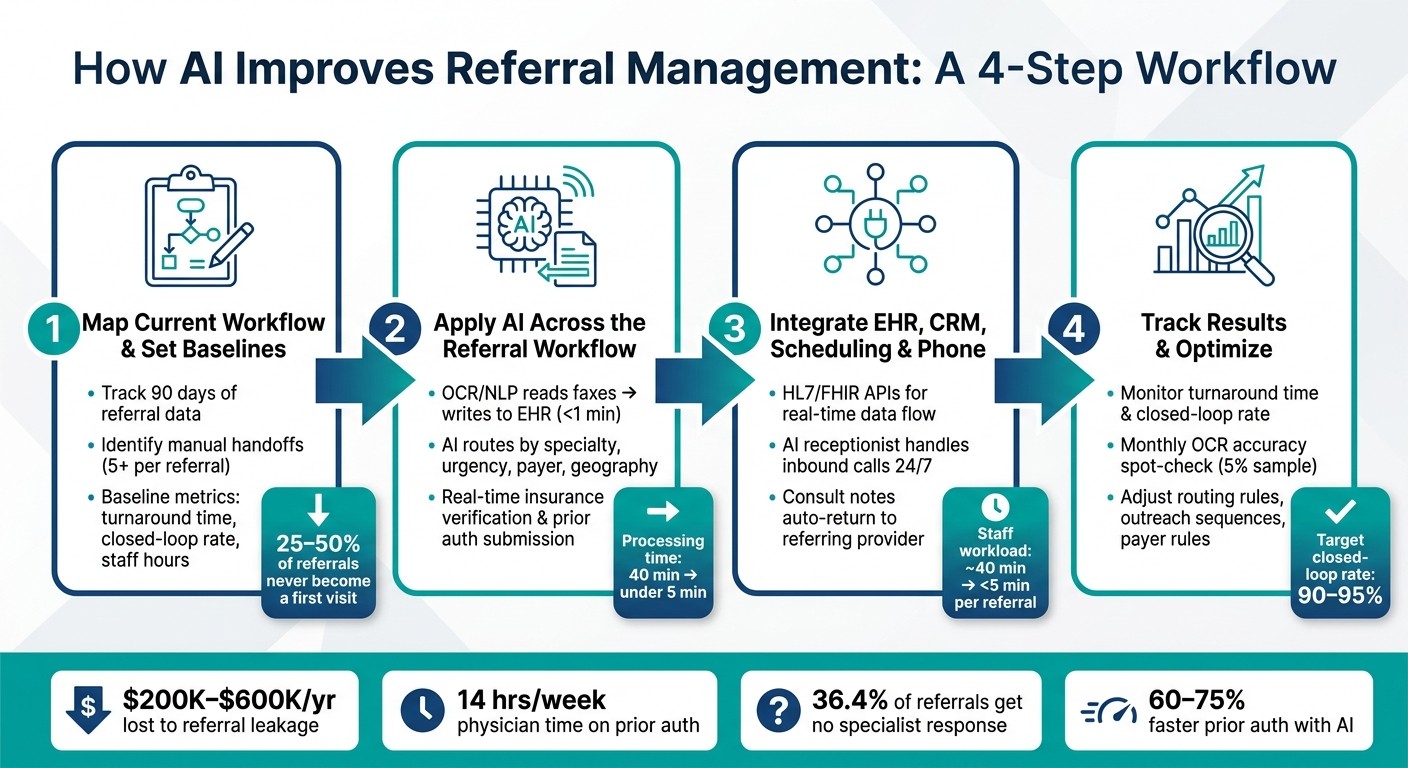
AI-Powered Referral Management Workflow: 4 Steps to Reduce Leakage
24/7 Referrals: How Voice AI + Referral Platforms Capture Every Opportunity, Even After Hours
Step 1: Map Your Current Referral Process and Set Baseline Metrics
Before you automate anything, map how referrals move right now. Don’t start with software. Start with the actual workflow.
The point is simple: find the exact spots where AI can cut delays and keep referrals from getting stuck. Once you can see the path clearly, it becomes much easier to spot where AI can remove re-entry, cut down on follow-up, and close referral gaps.
Document Referral Sources, Systems, and Handoffs
Map each stage from receipt to closure, including the owner, system, and handoff at every step. In many practices, referrals move across separate EHR, CRM, fax, scheduling, and payer tools. Every manual handoff is a place where something can drop.
Look for at least five handoffs between referral receipt and the first patient visit, and note where staff are re-entering data [1].
Pay close attention to fax handling too. If staff are splitting multi-patient or multi-document faxes by hand, mark that down. It’s a common source of mistakes and wasted time [6]. Check for unlogged faxes, misrouted documents, and incomplete referrals that are missing insurance details, a reason for referral, or patient contact information [6]. Then compare referring-office logs with your own receipt records to spot missing documents [6].
Referral intake affects access, throughput, and revenue.
Also, flag any step that touches insurance verification or prior authorization. Those are compliance-sensitive and need extra care.
Track the Metrics That Matter
After the workflow map is done, pull 90 days of referral data from your EHR to set a baseline grounded in facts, not guesses.
Start with your closed-loop completion rate. That’s the share of referrals that end with all three of these:
a scheduled visit
a completed visit
a returned consult note [9]
This matters because referral leakage is expensive. It costs primary care and multispecialty practices between $200,000 and $600,000 per year on average [9]. On top of that, only 55% of referral revenue tied to employed PCPs is actually realized in-network [6]. If you don’t have a baseline, you won’t be able to show whether AI improved referral completion, speed, or revenue.
Use the table below to record your starting point before making changes:
Metric | Current Value (Baseline) | Target Value | Data Source |
|---|---|---|---|
Monthly Referral Volume | [Insert Count] | Maintain/Grow | EHR/Fax Log |
Time from Receipt to Scheduled | [Insert Days] | Same Day Scheduling [6] | EHR/Scheduling Software |
Closed-Loop Completion Rate | [Insert %] | 90–95% [9] | EHR/Consult Notes |
Staff Hours per 100 Referrals | [Insert Hours] | < 1 Hour [5] | Staff Audit/Time Study |
Referral Turnaround Time | [Insert Days] | 2 Days [2] | EHR Audit |
Lost Referral Revenue | [Insert $ Amount] | Minimize Leakage | Financial/Billing Records |
Use this baseline to aim AI at the parts of the workflow with the most delay and leakage. These numbers show which problems need fixing next.
Step 2: Apply AI at Each Stage of the Referral Workflow
Once you have your baseline metrics, you can put AI where it will do the most good. In most cases, the rollout is pretty simple: start with intake, move to triage and routing, then handle insurance verification. That order matters because each step sets up the next one.
Use AI for Intake, Document Extraction, and Record Creation
Intake is where a lot of referral mistakes begin. Faxes come in as unstructured PDFs, and staff often have to type patient details into the EHR by hand. That’s slow, and it opens the door to typos, duplicate charts, and missing records.
When one fax includes documents for multiple patients or several document types, AI can split the file on its own and send each piece to the right record [6].
Using OCR and NLP, the system reads incoming faxes, pulls out key fields, and writes that data into the EHR [3][8]. And this is the key part: it doesn’t just attach the fax as a PDF. It fills the actual EHR fields.
Before anyone on staff even opens the file, the system can check it against a specialty checklist. If required documents are missing, or if patient details don’t match, the case should be sent for human review before chart creation instead of creating a duplicate chart [6][4]. That changes the intake coordinator’s job in a big way. Instead of touching every single referral, they focus on the exceptions [6][8].
Manual referral processing usually takes 40 minutes per referral. AI-assisted extraction can cut that to under 5 minutes, with 95%+ accuracy even when fax quality is poor [4].
Step | Manual Process | AI-Automated Process |
|---|---|---|
Data entry | Manual transcription from fax (20 min) [4] | Automated extraction and EHR write-back (<1 min) [4] |
Document sorting | Manual triage and file splitting | Auto-classified and split by patient/document type |
Patient matching | Prone to duplicates and typos | High-confidence matching with exception flagging |
Missing field check | Caught during scheduling (if at all) | Flagged at intake before staff review |
Once the record is clean, the referral can move straight into routing.
Use AI for Triage, Routing, and Scheduling Outreach
After intake, the next job is simple: get the referral into the right queue fast.
AI can route referrals based on specialty, urgency, payer network status, geography, and provider availability [6]. If it’s trained on specialty rules, it can tell the difference between a routine case and an urgent one, then send each down the right path without staff stepping in [6].
Scheduling outreach can start right away. The system sends SMS, email, or voice messages within minutes of receiving the referral, and it can do that in the patient’s preferred language when needed [3][8]. It also keeps following up until an appointment is booked.
That speed matters. Patients who don’t hear from a specialist soon enough often go somewhere else. In manual workflows, 20% to 30% of referrals are lost [3], and about 36.4% of referral requests receive no response from specialist offices [10]. Automated outreach that runs across the full queue helps close that gap and cuts down on dropped referrals.
Use AI for Insurance Verification and Prior Authorization Support
Before scheduling moves ahead, coverage and authorization status need to be checked. This is one of the biggest sources of delay in referral workflows.
Physicians spend an average of 14 hours per week on prior authorization work [1]. On top of that, manual eligibility checks take 8 to 15 minutes per patient [1]. That’s a lot of staff time spent logging into payer portals and chasing details.
AI helps by querying payer databases in real time before scheduling. It pulls eligibility and benefits data straight into the EHR or CRM, so staff don’t have to log into a separate payer portal [1].
If prior authorization is needed, the system can map the clinical documentation to payer-specific approval rules and submit the request automatically [1][8]. Some setups also use predictive models to flag cases that are likely to be denied - with 94% accuracy in some implementations [11]. That gives staff a chance to add supporting documents before submission.
AI-driven prior authorization workflows have shown 60%–75% faster turnaround times than manual processes [1]. Early eligibility checks and authorization review help cut abandoned referrals and move cases through faster.
Step 3: Connect AI Workflows to EHR, CRM, and Call Handling Systems
Automation works best when intake, scheduling, communication, and reporting all move through the same data flow. That link keeps referrals from getting stuck between intake and completion.
Build Secure Data Flows with Clear System Ownership
Before you connect anything, decide which system owns which data. The EHR should hold clinical records. The CRM or AI platform should track outreach status and communication logs. That split helps you avoid duplicate records and conflicting updates.
Use HL7 or FHIR APIs instead of batch imports so referral data lands in the EHR right away. The same idea applies when closing the loop: specialist consult notes and visit summaries should flow back into the referring provider's EHR automatically, so care gaps don't get missed.
Security matters here, and not in a vague checkbox kind of way. Every vendor that touches patient data needs a signed Business Associate Agreement (BAA) and HIPAA-compliant infrastructure. SOC 2 Type II adds another layer of confidence. Access controls should limit who can view or edit referral records, and the system should mask sensitive data in chat and call logs. It also helps to use platforms that record when the referral came in, how it was classified, and where it was routed [6].
Use AI Receptionists and Workflow Automation for Referral Intake
Once your systems are connected, phone intake can enter the same workflow without manual re-entry. That's a big deal because a large share of referral intake still happens by phone, and that's often where details get delayed, misplaced, or lost.
An AI-powered receptionist can answer inbound referral calls 24/7, collect patient details, and schedule or reschedule appointments while staff step in only for exceptions. Instead of leaving a voicemail for someone to transcribe later, it sends structured data straight into the EHR, CRM, or scheduling system.
Lead Receipt's AI receptionist and workflow automation tools can capture referral calls 24/7 and push structured data into CRMs and scheduling systems.
Disconnected Workflows vs. Integrated AI Automation
The table below shows the difference between siloed referral work and a connected AI setup:
Capability | Disconnected Workflow | Integrated AI Automation |
|---|---|---|
Data Visibility | Siloed across faxes, inboxes, and spreadsheets | Real-time tracking across all systems |
Reporting Quality | Retrospective; relies on manual status updates | Real-time analytics with automated audit logs |
Staff Workload | ~40 minutes per referral [4] | Under 5 minutes per referral (exception handling only) [4] |
Watch the impact in referral speed, completion rates, and communication quality.
Step 4: Measure Results and Refine the Workflow Over Time
Monitor Referral Speed, Completion, and Communication Quality
Once the workflow is live, the next job is simple: find the spots where it still falls apart. Compare post-launch performance with the 90-day baseline you collected before implementation [9].
Start with two core metrics: referral turnaround time and completion rate. Turnaround time tells you how long it takes from receiving a referral to contacting the patient. AI can shrink that window from hours to minutes [10]. Completion rate shows whether the referral turns into a scheduled visit, a completed visit, and a returned consult note.
Closed-loop rates often go up after automation. Track your own closed-loop rate against your baseline. That side-by-side view is far more useful than generic industry benchmarks.
Speed isn't the whole story, though. You should also watch outreach response rates and call abandonment. If patients aren't replying to scheduling outreach, that's a sign the contact sequence needs work. Sending more messages usually won't fix a weak process.
Review AI Accuracy and Adjust Workflow Rules
If results improve in some areas but stall in others, look at the automation layer next. Speed and completion tell you what happened. Accuracy checks help explain why it happened.
Problems here tend to show up as delayed intake, incorrect routing, or weak outreach. Review a monthly 5% sample of faxed referrals to check OCR and NLP accuracy. Also track the exception rate - the share of referrals pushed to human review. That number can point to broken templates, payer rule changes, or routing thresholds that cast too wide a net. If the exception rate starts climbing, there's usually an issue with a template, payer rule, or routing logic.
If scheduling conversion is low, adjust the outreach sequence, channel, or language preference [5][7]. If routing slows down, check whether the AI's classification logic is separating urgency levels the right way [6].
A simple review cadence helps keep small issues from turning into a mess:
Maintenance Task | Frequency | Responsible Party |
|---|---|---|
Exception queue age review | Weekly | Care coordinator |
Fax OCR accuracy spot-check (5% sample) | Monthly | Care coordinator |
Payer network / authorization rule update | Monthly | Billing team |
Referral leakage rate benchmark review | Monthly | Practice administrator |
Specialist connectivity tier audit | Quarterly | IT + Care coordinator |
Use these metrics to shape the next round of workflow changes.
Conclusion: A Practical Path to Better Referral Workflows
The biggest wins come from removing manual steps that lead to delays, missed referrals, and broken loops - not from throwing more staff at a bad process. When intake is automated, routing follows set rules, and outreach runs on a defined sequence, staff can spend their time on cases that need human judgment.
"AI-powered referral automation is the approach that fixes referral leakage structurally, not by hiring more coordinators to run the same process faster, but by replacing the manual steps themselves with AI agents." - Sami Malik, CEO & Co-Founder, Linear Health [3]
For high-volume inbound referral calls, Lead Receipt's AI receptionist and workflow automation can answer calls 24/7 and send structured data into your current systems. The aim is a referral process that moves faster, closes the loop, and cuts down on manual follow-up.
FAQs
Where should AI be added first?
Start with the inbound intake process. When you automate how incoming faxes are captured and processed, you remove the manual triage bottleneck that often slows everything down.
Use AI first to ingest documents, classify referral types, extract key patient and provider data, and update electronic health records automatically. That cuts admin work and sets up a structured data flow before you move into patient outreach and scheduling.
How do I measure referral workflow improvement?
Measure improvement by tracking outcomes, not just product features.
The metrics that matter most are:
Referral-to-visit conversion rate
Total referral turnaround time
Referral leakage
No-show rates
Staff manual processing time
Overall referral completion rates
With AI optimization, many organizations see a 25% to 40% lift in referral-to-visit conversion, up to an 80% drop in manual processing time, and referral completion rates of 90% to 95%.
What systems need to connect for referral automation?
Referral automation works best when connected systems share data in real time, in both directions. At a minimum, the EHR should connect with insurance verification systems, payer authorization databases, external scheduling platforms, and revenue cycle management systems.
It should also connect with existing fax servers and secure email systems, so referral documents can be pulled in and added to the EHR accurately.