HIPAA Compliance with Automated Reporting
Healthcare Technology
Updated Jan 18, 2026
How to implement HIPAA-compliant automated reporting: risk assessments, RBAC, encryption, BAAs, breach response, training, and audits to protect ePHI.
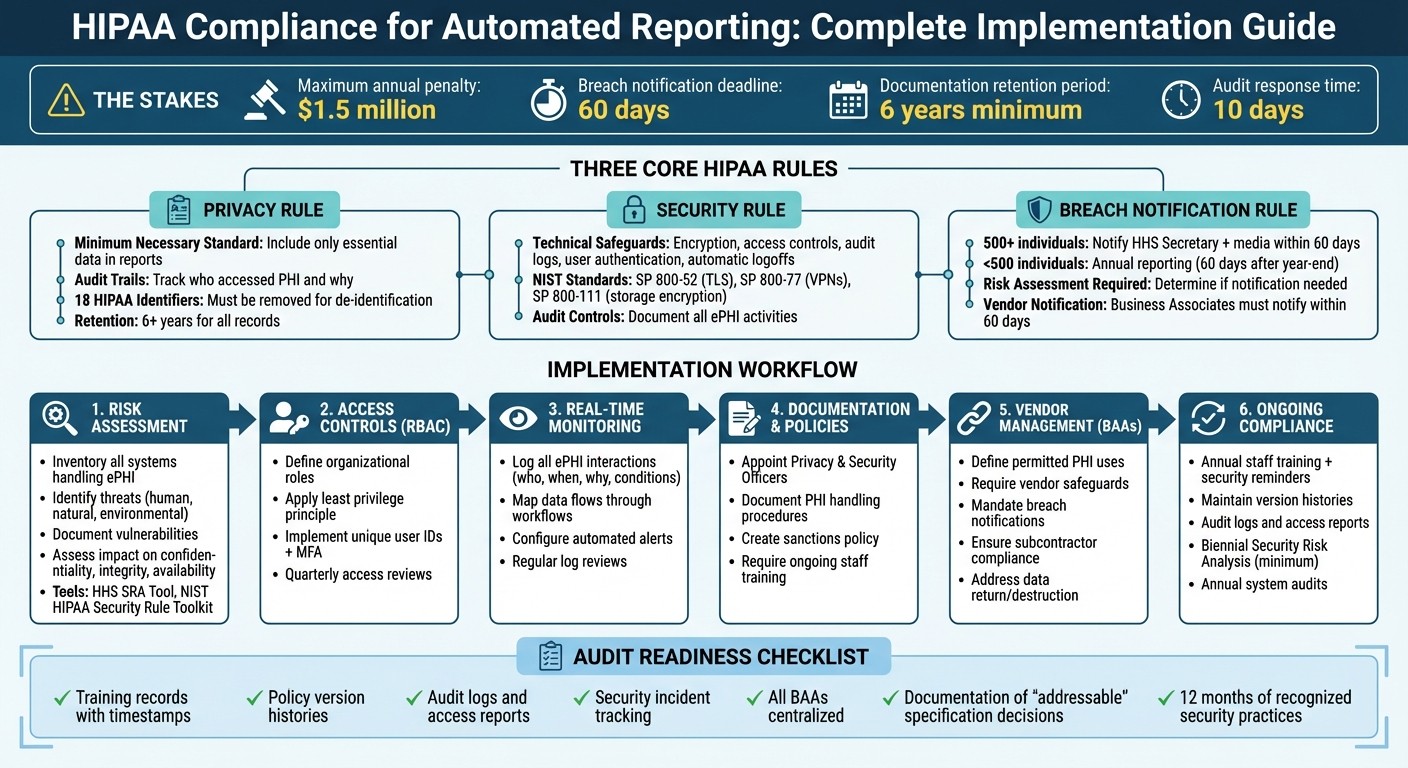
Automated reporting can streamline healthcare tasks like scheduling and data management, but it must comply with HIPAA regulations to protect patient information. Non-compliance risks include penalties up to $1.5 million annually and harm to patients, such as identity theft or financial loss. To ensure compliance:
Privacy Rule: Limit data in reports to what's necessary and maintain audit trails for at least six years.
Security Rule: Use safeguards like encryption, access controls, and secure data transmission to protect electronic PHI (ePHI).
Breach Notification Rule: Notify affected individuals, HHS, and media (for breaches over 500 individuals) within 60 days.
Key steps include conducting risk assessments, implementing role-based access controls, and securing Business Associate Agreements (BAAs) with vendors. Regular staff training, documentation, and system audits are essential for maintaining compliance and avoiding penalties.
This guide covers practical measures to protect patient data while leveraging automated reporting effectively.
HIPAA Compliance Checklist for Automated Reporting Systems
Automating HIPAA and GxP Compliance using CloudHub's CompQ Solution
HIPAA Rules That Apply to Automated Reporting
When it comes to handling Protected Health Information (PHI) in automated reporting, three key HIPAA rules take center stage: the Privacy Rule, the Security Rule, and the Breach Notification Rule. These rules establish the groundwork for creating secure and compliant workflows that minimize data exposure and ensure timely responses to breaches.
Privacy Rule: Safeguarding PHI in Automated Reports
The Privacy Rule outlines how PHI can be used and shared, even in automated systems. It emphasizes the "minimum necessary" standard, meaning only essential data should be included in reports. For instance, a scheduling report might list patient names and appointment times but omit sensitive details like diagnosis codes or insurance information. Automated systems must also adhere to permitted uses under Treatment, Payment, and Health Care Operations. Any other use requires explicit individual authorization [6].
"A major goal of the Privacy Rule is to assure that individuals' health information is properly protected while allowing the flow of health information needed to provide and promote high quality health care." [6]
To stay compliant, set up reporting templates that exclude unnecessary identifiers. For analytical purposes, de-identify data by removing all 18 HIPAA-specified identifiers or obtaining a formal determination of de-identification. Automated systems should also maintain audit trails to track who accessed PHI and why, supporting the "accounting of disclosures" requirement. These records must be retained for at least six years [7].
Security Rule: Protecting ePHI with Safeguards
The Security Rule focuses on protecting electronic PHI (ePHI) through technical, physical, and administrative safeguards.
"The Security Rule is designed to be flexible, scalable, and technology neutral, enabling a regulated entity to implement policies, procedures, and technologies that are appropriate for the entity's particular size, organizational structure, and risks to ePHI." [7]
Technical safeguards might include access controls, audit logs, data integrity checks, user authentication, and secure data transmission. For example, assign unique identifiers to users, set up emergency access procedures, and enable automatic logoffs after inactivity. Encryption, while not mandatory, is highly effective - encrypted ePHI that is lost or stolen is "unusable, unreadable, or indecipherable" to unauthorized parties [4]. To ensure compliance, follow recognized NIST standards, such as SP 800-52 for TLS, SP 800-77 for VPNs, and SP 800-111 for storage encryption. Additionally, audit controls should document all activities involving ePHI.
Breach Notification Rule: Responding to Data Breaches
If a data breach occurs in your automated reporting system, specific notification protocols must be followed. A breach is defined as any unauthorized use or disclosure that compromises the privacy or security of PHI [4].
The first step is to determine whether notification is necessary.
"An impermissible use or disclosure of protected health information is presumed to be a breach unless the covered entity or business associate, as applicable, demonstrates that there is a low probability that the protected health information has been compromised based on a risk assessment." [4]
Conduct a risk assessment to determine if PHI was accessed, evaluate the exposure of identifiers, and review mitigation measures. If the system uses HHS-approved encryption, notification requirements may not apply.
For breaches, notify affected individuals via first-class mail or approved email within 60 days of discovery. Breaches involving 500 or more individuals also require notifying the HHS Secretary and prominent media outlets within the same timeframe. Smaller breaches (affecting fewer than 500 individuals) can be reported annually, no later than 60 days after the calendar year ends. If a third-party vendor manages automated reporting, ensure your Business Associate Agreement requires the vendor to notify you promptly - within 60 days of discovering a breach. Keep detailed documentation of all risk assessments and notifications for at least six years [7].
Building a HIPAA-Compliant Automated Reporting Workflow
Creating a secure automated reporting workflow requires careful planning and constant oversight to protect patient information. Each step of the process is designed to safeguard sensitive data while maintaining operational efficiency.
Conducting a Risk Assessment of Automated Systems
A solid risk assessment is the cornerstone of HIPAA compliance. As the Office for Civil Rights (OCR) puts it, "Risk analysis is the first step in an organization's Security Rule compliance efforts" [5]. This analysis must cover all electronic protected health information (ePHI) that your automated system generates, receives, stores, or transmits - including workstations, networks, and mobile devices.
Start by defining the scope of your assessment. Inventory all systems that handle ePHI, whether in storage, transit, or through vendor access [10]. Next, identify potential threats and vulnerabilities by documenting both technical and administrative risks. Review your current security measures to evaluate their effectiveness and determine whether they are being used as intended. Finally, assess the likelihood and impact of each risk, estimating the probability of threats exploiting vulnerabilities and the potential harm to your organization. Assign priority levels to the risks, focusing on the most critical issues first.
Risk Assessment Element | Description |
|---|---|
Scope of Analysis | Covers all ePHI in all forms of electronic media and transmission [5]. |
Threat Identification | Accounts for human (intentional/unintentional), natural, and environmental risks [5]. |
Vulnerability ID | Highlights flaws in system security procedures, design, or internal controls [5]. |
Impact Assessment | Evaluates potential harm to ePHI confidentiality, integrity, and availability [5]. |
Leverage tools like the HHS Security Risk Assessment (SRA) Tool or the NIST HIPAA Security Rule Toolkit to guide your process [5][1]. Document your findings thoroughly to support ongoing risk management and ensure you’re prepared for audits. Keep in mind that risk analysis is not a one-and-done task. The OCR stresses that "A truly integrated risk analysis and management process is performed as new technologies and business operations are planned, thus reducing the effort required to address risks identified after implementation" [5]. Update your assessment whenever you adopt new technologies, adjust business operations, or encounter security incidents [5][9].
Once risks are identified and prioritized, the next step is to control access to ePHI by implementing role-based restrictions.
Setting Up Role-Based Access Controls (RBAC)
Role-based access controls (RBAC) are essential for limiting exposure to ePHI. By restricting access to only what’s necessary for specific job roles, you align with the Minimum Necessary Standard, which is a key HIPAA requirement [12][13].
Start by defining the roles within your organization and documenting which job functions require access to ePHI. For instance, billing staff may need access to insurance details and payment records, while scheduling staff only require information like patient names and appointment times. Enforce the principle of least privilege by granting users the minimum level of access required for their role [13].
To strengthen access security, implement unique user IDs, multi-factor authentication (MFA), and automatic logoff features [11][13]. Use Governance, Risk, and Compliance (GRC) software to automate regular reviews of user permissions and access logs, ideally on a quarterly basis [12][13]. As Roger Severino, Director of the Office for Civil Rights, warns: "We know that large healthcare entities are attractive targets for hackers, which is why they are expected to have strong password policies and to monitor and respond to security incidents in a timely fashion - or risk enforcement by OCR" [12].
Setting up secure access is just one part of the equation. Real-time monitoring ensures that any suspicious activity is caught before it escalates.
Adding Real-Time Monitoring and Alerts
Real-time monitoring plays a critical role in identifying unauthorized access or unusual activity before it turns into a major breach. The HIPAA Security Rule mandates the use of audit controls - mechanisms that record and analyze activity in systems handling ePHI [7].
Configure your automated systems to log every interaction by default. These logs should capture details such as who accessed the data, under what conditions, the specific time, and the purpose of the access [10]. As the Guardian Health Team points out, "In regulated environments, the absence of evidence is often interpreted as the absence of control" [10].
Map out where your data is stored and how it moves through automated workflows. HIPAA compliance hinges on understanding data flows and ensuring that sensitive information isn’t exposed unnecessarily [10]. Apply monitoring and controls before your automated system processes sensitive data. The Guardian Health Team emphasizes that "If sensitive data reaches a system unnecessarily, compliance has already failed, no matter how clean the output looks" [10].
Regularly review access logs to identify unauthorized activity [7]. Tailor your monitoring and alert systems to the specific needs of each workflow, rather than applying blanket rules. This approach ensures that alerts are meaningful and actionable. Additionally, use technical safeguards to protect ePHI during transmission over electronic networks [7].
Creating Policies and Vendor Agreements
Clear policies and vendor agreements are essential for building secure, automated reporting workflows. These documents provide the legal foundation for HIPAA compliance. Even the most secure automated system can leave your organization vulnerable to penalties or data breaches without proper documentation.
Documenting Policies for Automated Reporting
Start by appointing dedicated HIPAA Privacy and Security Officers to oversee the creation and enforcement of policies for automated workflows. These policies should spell out how Protected Health Information (PHI) is handled, disclosed, and safeguarded within your automated processes. Implement role-based access controls to limit sensitive data access to authorized personnel only, and establish clear procedures for responding to incidents.
It's also important to include a written sanctions policy that outlines consequences for staff who fail to follow HIPAA procedures. This serves not only as a deterrent but also as a guide for enforcement when violations occur. Additionally, require ongoing HIPAA training for all employees, covering both general privacy rules and practical topics like phishing awareness and password security.
Keep in mind that all HIPAA-related documentation - such as policies, risk assessments, and justifications for your security measures - must be retained for at least six years. These internal policies create a solid foundation for your vendor agreements.
Setting Up Business Associate Agreements (BAAs)
Vendors handling PHI on your behalf, such as automation platforms like Lead Receipt, are considered Business Associates under HIPAA. This includes services that manage patient data using AI for tasks like call handling, scheduling, or workflow automation. Before sharing any PHI, ensure you have a signed Business Associate Agreement (BAA) in place.
A BAA should include the following key elements:
Clearly define how PHI can be used under the agreement
Require the vendor to implement proper safeguards to protect PHI
Mandate timely breach notifications and vendor communication
Ensure the vendor's subcontractors meet HIPAA compliance standards
State that PHI must be returned or destroyed when the agreement ends
Perform thorough due diligence by reviewing the vendor's most recent risk assessments and HIPAA policies. For larger cloud providers, confirm that the specific services you use are explicitly listed as "in-scope" or "eligible" under their standard BAA. As Steve Alder, Editor-in-Chief of HIPAA Journal, cautions:
"If a covered entity fails to conduct due diligence to ensure a business associate is HIPAA-compliant prior to entering into an agreement... the covered entity may be considered liable for the breach."
The financial consequences of non-compliance are significant, as highlighted by recent penalties [14].
To further strengthen your compliance efforts, align your Service Level Agreements (SLAs) with the terms of your BAAs. These should address system availability, data recovery, and the return or destruction of data when services are terminated. You might also consider setting stricter breach reporting timelines - while HIPAA allows up to 60 days for notification, you can require vendors to report potential breaches within 24 to 48 hours. Regularly review and update your BAAs to ensure they stay in step with evolving HIPAA requirements.
Maintaining Compliance: Training, Documentation, and Monitoring
HIPAA compliance isn't a one-and-done task - it’s an ongoing process. Even with secure systems and agreements in place, staying compliant requires consistent staff training, thorough documentation, and regular audits. These three pillars are essential for maintaining compliance and avoiding costly penalties during audits.
Training Staff on Automated Reporting and HIPAA
Once secure workflows and agreements are established, keeping your team well-trained is critical for maintaining HIPAA compliance. Employees need to be equipped to handle electronic protected health information (ePHI) securely, especially when using automated systems.
Training should ensure staff understand what constitutes PHI, including indirect identifiers like email addresses or phone numbers that automated systems might capture. It’s important to tailor training to your organization’s specific workflows, risks, and employee roles. This includes covering the Privacy, Security, and Breach Notification Rules as they relate to ePHI in automated systems [2][7]. As Sarah Badahman from HIPAAtrek explains:
"Training is what truly creates compliance in action" [15].
Employees should also be trained on clear procedures for identifying, responding to, and documenting potential security incidents or breaches [9][3]. For more on technical safeguards like multi-factor authentication and encryption, refer to the earlier Security Rule section.
Ensure new hires receive training promptly, and update all staff whenever there are technological or procedural changes [15][9]. Between annual training sessions, periodic "Security Reminders" can be used to reinforce compliance and threat awareness, as required by the Security Rule [15][9].
Keeping Documentation for Audit Readiness
If the Office for Civil Rights (OCR) selects your organization for an audit, you’ll have just 10 days to provide the requested documentation [15]. To be prepared, centralizing your records is essential. As Melanie Fontes Rainer, Director of OCR, stated:
"OCR intends to initiate audits of HIPAA-regulated entities later this year" [15].
Keep version histories for all policies and procedures [15]. For automated systems, maintain audit logs, access reports, and security incident tracking reports to show regular monitoring of system activity [9]. Training records should include details like the training name, content summary, completion date, and electronic authentication (e.g., timestamps) for each participant [15].
If you decide not to implement an "addressable" HIPAA specification, document your reasoning and explain the alternative measure you’ve adopted [9][5]. Store all Business Associate Agreements in one centralized location; scattered records across different departments increase risks during audits [15].
Specialized compliance platforms can streamline this process by automatically tracking document versions, recording security reminders, and timestamping training completions [15][16]. Proper documentation not only ensures smooth audits but also helps identify and address non-compliance quickly.
Running Regular System Audits
Regular audits are key to identifying vulnerabilities before they lead to breaches. The HIPAA Security Rule requires organizations to routinely monitor information system activity, including audit logs, access reports, and security incident tracking [9].
Schedule annual audits, but also conduct additional reviews after significant incidents or changes, documenting findings and corrective actions [5][17]. Trigger-based audits are especially useful when introducing new technologies, responding to security incidents, or experiencing significant staff turnover [5].
Tools like the HHS Security Risk Assessment (SRA) Tool and the NIST HIPAA Security Rule Toolkit can help you perform self-assessments and uncover vulnerabilities [5][1]. Complete a Security Risk Analysis at least every two years or whenever major changes occur, such as implementing new automated reporting software [15].
The OCR now considers whether "recognized security practices" have been in place for the previous 12 months during audits and enforcement actions [8]. Keeping detailed records of all audit activities, identified issues, and corrective measures not only demonstrates your commitment to compliance but can also help reduce penalties if problems arise [17].
Conclusion
Automated reporting in healthcare must align with HIPAA regulations to protect patient information and avoid steep penalties. As Steve Alder, Editor-in-Chief of HIPAA Journal, aptly states:
"Ignorance of the HIPAA requirements is not an acceptable defense against enforcement action" [2].
The consequences of non-compliance go far beyond financial penalties [18]. They can disrupt operations and severely damage an organization's reputation [2]. This checklist serves as a guide to ensure you're taking the necessary steps to meet compliance standards.
Key actions include completing thorough risk assessments, implementing proper safeguards, securing Business Associate Agreements (BAAs), and maintaining ongoing training and documentation. It's also crucial to retain records consistently [2]. If a breach impacts 500 or more individuals, you’re required to notify the HHS Secretary and local media within 60 days [4].
Additionally, organizations that demonstrate 12 months of consistent recognized security practices may gain some advantages during audits [8]. Compliance should never be treated as a one-time task. By treating it as a continuous effort, you not only protect sensitive patient data but also foster trust and ensure the seamless operation of your healthcare processes.
FAQs
What HIPAA rules should I consider when using automated reporting in healthcare?
When integrating automated reporting into healthcare systems, it's crucial to follow three primary HIPAA regulations to ensure compliance and protect patient data:
Privacy Rule: This rule safeguards patients' personal health information (PHI), ensuring it is only shared for authorized purposes and with proper consent.
Security Rule: Focused on electronic PHI (ePHI), this rule requires implementing robust protections like controlled data access, encryption, and secure storage practices.
Breach Notification Rule: In the event of a data breach, this rule obligates you to notify both the affected individuals and the Department of Health and Human Services (HHS) promptly.
By following these rules, healthcare providers can maintain compliance and uphold the confidentiality and security of patient information within automated reporting systems.
What steps should healthcare organizations take to ensure their automated reporting systems comply with HIPAA?
Healthcare organizations must meet administrative, physical, and technical safeguards outlined in the HIPAA Security Rule to ensure their automated reporting systems are compliant. A good starting point is conducting a thorough risk analysis to understand how electronic protected health information (ePHI) is created, stored, transmitted, and accessed. This process helps identify vulnerabilities, which can then be addressed with appropriate mitigation strategies.
Here’s what you need to focus on:
Establish Clear Policies and Training: Develop written policies, provide regular staff training, and ensure all vendors handling ePHI sign Business Associate Agreements (BAAs).
Secure Data Storage: Whether data is stored on-premises or in the cloud, use secure environments equipped with encryption, access controls, and audit trails.
Strengthen Data Protection: Encrypt data both at rest and in transit, enforce role-based access controls, require strong passwords, and enable automatic audit logging to track any unauthorized access.
If your organization uses automated tools, make sure the system encrypts all reports, limits access strictly to authorized users, and generates detailed audit logs for regular review. Tools like Lead Receipt’s AI-powered solutions can simplify workflows while meeting HIPAA standards. They offer features such as role-based access, encryption, and compliance-ready audit trails, all under a signed BAA to ensure accountability.
What should I do if there’s a data breach in an automated reporting system?
If an automated reporting system experiences a data breach, the first priority is to contain and secure the system. Start by isolating the affected system to prevent further exposure, disabling any compromised accounts, and safeguarding any exposed electronic protected health information (ePHI). Conduct a detailed investigation to determine what data was accessed, how many individuals were impacted, and identify the root cause of the breach. Be sure to document all findings and involve your HIPAA compliance or privacy officer to ensure a well-coordinated response.
Next, comply with the HIPAA Breach Notification Rule. If fewer than 500 individuals are impacted, notify the Secretary of Health and Human Services (HHS) through the OCR portal within 60 days. However, if the breach involves 500 or more individuals, notify HHS without delay. Additionally, inform affected individuals in writing and, if necessary, notify the media. Your notification should clearly explain the breach, the type of data involved, steps individuals can take to protect themselves, and what your organization is doing to prevent further harm.
Finally, focus on fixing the root cause. Update relevant policies, patch security vulnerabilities, and tighten access controls. Conduct a post-incident review to identify areas for improvement and strengthen your system to reduce the risk of future breaches.