EHR CRM Integration: How to Connect Electronic Health Records with Your CRM
Healthcare Technology
Updated May 21, 2026
How to connect EHRs and CRMs for bidirectional sync, HIPAA-safe data sharing, real-time vs batch options, and practical integration steps.
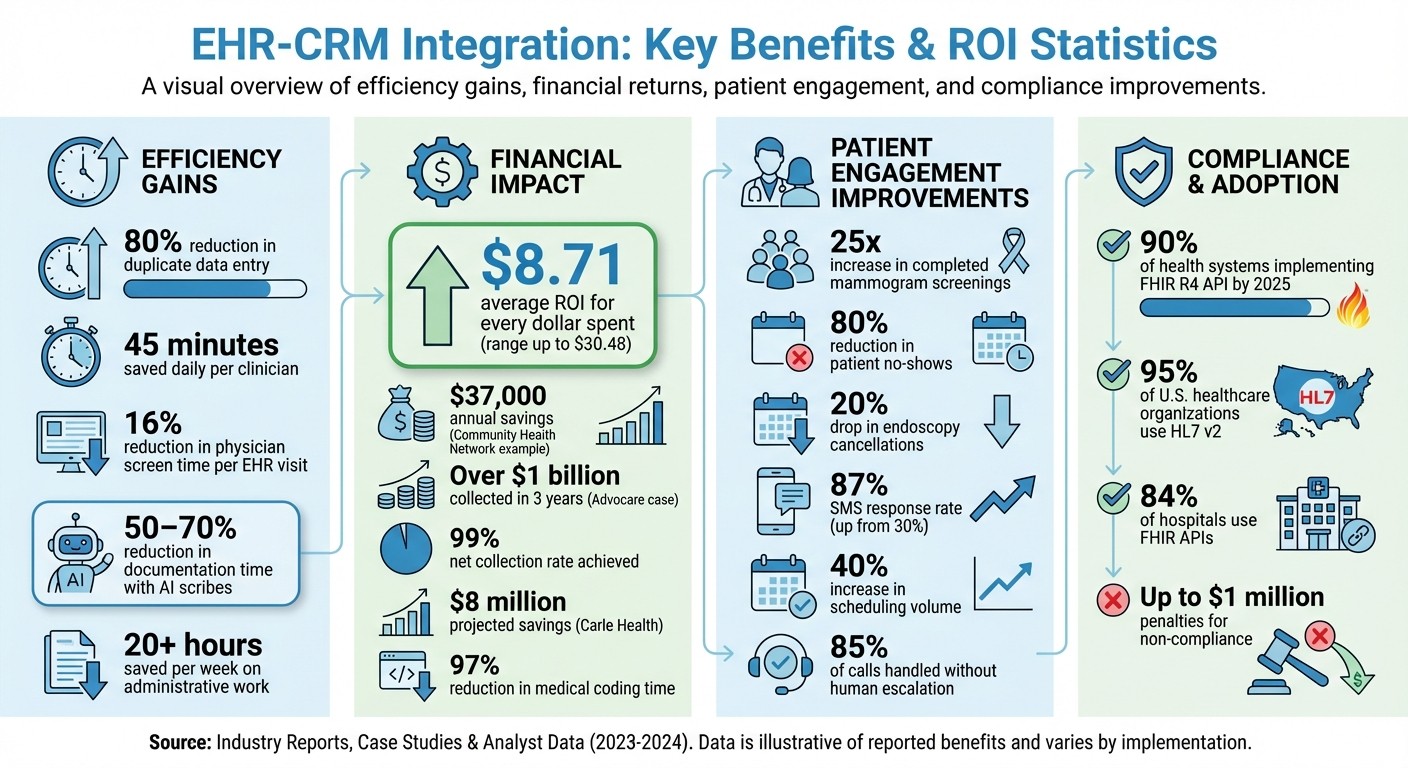
EHR-CRM integration eliminates inefficiencies by connecting clinical data (EHR) with patient engagement tools (CRM). This saves time, reduces errors, and improves communication. Clinics can cut duplicate data entry by 80%, save 45 minutes daily per clinician, and achieve an ROI of $8.71 for every dollar spent. Integration also addresses regulatory requirements like the 21st Century Cures Act and growing patient expectations for seamless digital experiences.
Key Benefits:
Streamlined Data Management: Syncs EHR updates (e.g., diagnoses) with CRM for accurate records.
Enhanced Patient Communication: Enables personalized outreach using clinical data.
Operational Efficiency: Automates workflows, reducing manual tasks.
Integration Options:
Real-Time Data Exchange: Instant updates for urgent tasks like appointment cancellations.
Batch Processing: Scheduled updates for large-scale reporting or analytics.
Technical Standards:
HL7 v2 for legacy systems.
FHIR APIs for modern, web-based integrations.
Both ensure compliance with HIPAA and secure data exchange.
Examples:
Epic’s "Cheers" CRM improved mammogram screenings by 25x and saved $37,000 annually.
MultiCare reduced no-shows by 80% using automation.
Steps to Integrate:
Verify EHR-CRM compatibility via APIs or middleware.
Map data flows for bidirectional sync.
Test systems in a sandbox and train staff.
EHR-CRM integration is a game-changer for clinics aiming to improve efficiency, meet patient expectations, and stay compliant.
EHR-CRM Integration Benefits: Key Statistics and ROI Data for Healthcare Clinics
Benefits of EHR-CRM Integration for Clinics
Simplifying Patient Data Management
Managing patient data becomes a hassle when EHR and CRM systems operate in silos. Without integration, clinics often deal with duplicate records making up over 20% of their database [5]. This duplication forces staff to waste time inputting the same information into multiple systems - once for clinical use and again for scheduling or marketing purposes.
Bidirectional data synchronization eliminates this inefficiency. For example, when a physician adds a new diagnosis to the EHR, it automatically updates in the CRM, enabling personalized outreach. Similarly, when a patient confirms an appointment through the CRM, the clinical schedule updates in real time [1][7]. This seamless data flow not only removes redundant tasks but also ensures both systems stay accurate. In fact, integration can cut physician screen time in EHRs by 16% per visit [5], allowing clinicians to dedicate more attention to patient care. This streamlined approach also sets the stage for more targeted patient engagement.
Improving Patient Communication and Engagement
An integrated system completely changes how clinics connect with patients. Instead of sending generic emails, staff can use clinical data from the EHR - like diagnoses, lab results, or preventive care schedules - to create tailored messages via the CRM.
Take Community Health Network, for example. They used Epic's "Cheers" CRM module to map patient data for targeted outreach. This effort led to a 25x increase in completed mammogram screenings and saved $37,000 annually by replacing manual phone calls with automated reminders [5]. The system identified eligible patients from clinical records and sent personalized notifications through their preferred channels.
Automation also improves appointment management. MultiCare, for instance, integrated Epic with SeamlessMD, a digital patient engagement platform. This integration enabled automatic enrollment for appointment reminders and pre-visit instructions. The results? A 20% drop in endoscopy cancellations and an 80% decrease in no-shows [5]. These enhancements in communication ripple outward, boosting overall clinic efficiency.
Increasing Operational Efficiency
EHR-CRM integration doesn’t just improve communication - it also automates workflows, cutting down on manual tasks. For instance, a lab result entered in the EHR can automatically trigger a follow-up reminder in the CRM. Similarly, insurance verification occurs automatically when appointments are scheduled, and billing codes entered during visits can prompt payment reminders without staff intervention.
These automated workflows complement the data and communication improvements, enhancing both patient care and administrative operations. Advocare provides a compelling example. By integrating eClinicalWorks billing data with CRM tools, they streamlined patient outreach and achieved impressive results. Over three years, including the COVID-19 pandemic, the organization collected over $1 billion in cash, maintained a 99% net collection rate, and grew by 20% [5]. This integration delivered an average ROI of $8.71 for every dollar spent [5], showing how operational efficiency directly impacts financial outcomes.
Creating a Cohesive Patient Journey with a CRM-EHR Integration || LeadSquared Webinars
Real-Time vs. Batch Data Exchange in EHR-CRM Integration
When deciding between real-time and batch data exchange for your clinic's EHR-CRM integration, the choice largely hinges on how quickly you need data updates. Real-time exchange leverages modern APIs to share information instantly. For instance, if a patient cancels an appointment in your EHR, your CRM can immediately adjust automated reminders. On the other hand, batch processing transfers data at set intervals - such as nightly, weekly, or monthly - using older standards like HL7 v2 or manual CSV imports.
Real-time integration relies on webhooks and active API endpoints to push or pull data as changes occur, while batch processing collects updates and sends them in bulk. The healthcare industry is rapidly adopting real-time solutions, with nearly 90% of health systems expected to implement at least one FHIR R4 API by the end of 2025 [5]. However, many clinics opt for a hybrid approach, using HL7 for legacy inpatient data while incorporating FHIR for more dynamic, patient-facing applications.
Benefits of Real-Time Data Exchange
Real-time synchronization provides immediate updates, which is critical for scenarios like urgent lab results or last-minute appointment bookings. For example, if a patient schedules an appointment through your portal, your clinical calendar updates instantly without requiring staff intervention. This level of responsiveness can significantly enhance patient care and reduce no-shows, as CRM systems can adjust messaging the moment a patient cancels [7].
To achieve this, robust APIs with high uptime - averaging 98% across the industry - are essential [5]. Falling below this reliability threshold can erode clinician trust. Real-time data exchange is particularly effective for tasks such as appointment reminders, urgent patient outreach, and medication adherence alerts - situations where delays could negatively impact patient outcomes or satisfaction.
When to Use Batch Data Exchange
Batch processing, in contrast, is better suited for high-volume, non-urgent tasks. Activities like population health reporting, marketing analytics, and territory planning don’t require instant updates, making scheduled data transfers a more efficient option. Running these processes overnight or weekly can reduce system strain during peak clinic hours.
"Real-time integration is helpful for immediate appointment triggers, while batch updates may be sufficient for reporting." - LeadSquared [7]
Batch processing works well for tasks like monthly reporting, marketing analytics, or large-scale data reconciliation. However, if your EHR uses legacy systems, you may need middleware solutions like MuleSoft or Redox to convert HL7 batch data into real-time API calls. These tools can bridge the gap between older systems and modern CRM platforms, ensuring smoother integration.
Feature | Real-Time Data Exchange | Batch Data Exchange |
|---|---|---|
Speed | Instant / Immediate | Scheduled / Periodic (e.g., nightly) |
Primary Standard | FHIR, REST APIs | HL7 v2, Flat Files (CSV/Excel) |
Best Use Case | Appointment triggers, cancellations, urgent updates | Reporting, marketing analytics, territory planning |
Patient Impact | High (immediate responsiveness) | Low (delayed communication) |
EHR API Integration Best Practices
Connecting your EHR and CRM effectively hinges on following established healthcare data standards and security protocols. A solid technical foundation ensures smooth communication between systems and compliance with federal regulations. By understanding key standards, synchronization methods, and security requirements, you can build a reliable integration framework.
HL7 and FHIR Standards Explained
Two major standards guide data exchange in healthcare systems: HL7 v2 and FHIR.
HL7 v2, a longstanding standard, uses pipe-delimited text messages to handle real-time transactions like patient admissions, lab orders, and results. It's still the go-to for 95% of U.S. healthcare organizations[11].
FHIR (Fast Healthcare Interoperability Resources), on the other hand, represents a newer approach. It uses RESTful APIs with JSON or XML formatting, breaking data into modular "resources" (like Patient, Medication, or Observation). This structure simplifies integration by leveraging standard web technologies. Today, 84% of hospitals use FHIR APIs, and the 21st Century Cures Act mandates FHIR-based APIs for all certified EHR systems, with penalties of up to $1 million for non-compliance [10][11].
Many organizations adopt a hybrid approach: continuing to use HL7 v2 for internal workflows while implementing FHIR APIs for patient-facing apps, mobile tools, and CRM integrations [10][11]. Additionally, integrating standard medical vocabularies like SNOMED CT, LOINC, and RxNorm ensures consistent data across systems [9][10].
Feature | HL7 v2.x | FHIR |
|---|---|---|
Architecture | Message-based (Pipes/Carets) | Resource-based (RESTful APIs) |
Data Format | Custom delimited text | JSON, XML, RDF |
Security | No built-in security; requires MLLP/VPN | Built-in OAuth 2.0, OpenID Connect, TLS |
Best For | Legacy systems, internal hospital workflows | Modern apps, cloud integration, patient access |
Leveraging these standards lays the groundwork for secure and efficient data exchange.
Setting Up Bidirectional Data Synchronization
Beyond standards, reliable synchronization ensures data flows seamlessly between systems. Bidirectional sync allows clinical updates like diagnoses and lab results to move from your EHR to your CRM, while administrative updates - such as contact details - flow back to the EHR [1]. Using a hub-and-spoke model with integration middleware improves scalability and avoids the complexity of direct point-to-point connections [1][11].
Accurate identity matching is crucial to avoid duplicate patient records. Employ Master Patient Index (MPI) logic or matching algorithms to reconcile identifiers across systems [3][6]. For authentication, OAuth 2.0 and SMART on FHIR provide secure, token-based access while ensuring applications only access authorized data [11][2].
Plan for ongoing maintenance from the outset. EHR vendors frequently update their systems, which may deprecate API endpoints, requiring adjustments to your integration. Allocate 15% to 20% of your initial development budget for annual maintenance [11]. Use error-handling mechanisms like ACK/NACK (Acknowledgment/Negative Acknowledgment) logic to catch message failures and apply exponential backoff strategies to manage API rate limits [2][3]. Caching reference data, such as provider lists, can also reduce API calls [2].
Data Security and HIPAA Compliance Requirements
Protecting patient data is non-negotiable. HIPAA mandates strict security measures for integrations, requiring encryption and secure transmission protocols. Data must be encrypted using AES-256 when stored and TLS 1.2 or higher during transmission [11][2][8]. Authentication should rely on OAuth 2.0, with SMART on FHIR providing an additional layer of security for healthcare-specific applications [11][2][3].
"Security remains one of the most dangerous integration challenges. Improper authentication, unencrypted transmission, and lack of audit trails significantly increases compliance penalties." - Pandi Paramasivan, CEO, CapMinds [3]
Ensure detailed audit logs are maintained to track every instance of Protected Health Information (PHI) access, including timestamps and user IDs [11][2][8]. These logs should be immutable and consolidated into a single repository for easy access during compliance audits [8]. Using a centralized identity provider with SAML or SSO protocols prevents permission mismatches when staff roles change [8][3].
Practice data minimization by syncing only the necessary data, such as demographics, appointment records, and consent flags, instead of treating your CRM as a storage system for all clinical data [8]. Always develop and test integrations in a sandbox environment with synthetic data to avoid exposing real PHI [2].
Security Layer | Requirement | Standard/Protocol |
|---|---|---|
Data at Rest | Encryption | |
Data in Transit | Encrypted transmission | |
Authorization | Token-based access | |
Identity | Centralized access | |
Monitoring | Accountability |
How to Integrate EHR and CRM Systems: Step-by-Step
Here’s a straightforward guide to integrating your EHR and CRM systems, covering everything from compatibility checks to system testing.
Step 1: Check EHR and CRM Compatibility
Start by ensuring your systems can communicate effectively. Compatibility hinges on both systems supporting the necessary API standards. With FHIR adoption growing by 300% since 2020 [2], it’s become the go-to standard for modern integrations.
Explore your EHR’s developer portal, such as Open.epic, Cerner Code Console, or athenahealth Developer Hub, to identify available API endpoints. Also, check marketplaces like Epic's App Orchard or Salesforce AppExchange for pre-built connectors. These can simplify deployment and reduce technical risks [4][2][7][3]. Cloud-based EHRs typically integrate more easily than older, on-premise systems, which might require middleware to fill compatibility gaps [1][2].
To avoid surprises, use vendor-provided sandbox environments to test API calls with synthetic data before moving to production [2][5]. If direct integration isn’t an option, consider middleware platforms like MuleSoft, Redox, or Workato, which may already have connectors for both your EHR and CRM [4][3].
Step 2: Map Data Flows Between Systems
Once compatibility is confirmed, define how data will flow between the systems. Map out field-level details for key information like demographics, appointment records, diagnoses (using ICD-10), and lab results (using LOINC) [3][5]. Set up trigger rules - for example, when a new patient is added to the EHR, it can automatically create a corresponding CRM record [1][4].
"Inconsistent data formats, terminologies, coding standards… create severe data-normalization integration challenges."
– Pandi Paramasivan, Founder & CEO, CapMinds [3]
Focus on syncing only the data that’s absolutely necessary to reduce security risks [8]. Decide which system will act as the authoritative source for specific data types. For instance, clinical notes are usually managed in the EHR, while communication preferences might be better handled in the CRM [5]. A great example is Advocare, which integrated eClinicalWorks billing data with CRM tools to enhance patient outreach. This approach helped them collect over $1 billion in cash with a 99% net collection rate and achieve 20% growth during the COVID-19 pandemic [5].
Step 3: Test the Integration and Train Staff
After mapping the data flows, it’s time to test the integration and prepare your team. Start with sandbox testing to safeguard live patient records [4][2]. Check individual field mappings, system load capacity, and how the integration handles API outages [4][5]. Failover testing is essential to ensure the system remains functional during disruptions [4][2].
Once testing confirms the system is stable, shift your focus to staff training. Proper training is critical because an integrated system can save clinicians up to 45 minutes per day by eliminating duplicate data entry [2].
Epic and athenahealth EHR CRM Integration Options
Epic and athenahealth cater to different segments of the healthcare industry, offering distinct pathways for CRM integration. Knowing these options can help you determine the best fit for your clinic’s needs.
Epic CRM Integration Capabilities
Epic holds a commanding 37–38% share of the enterprise healthcare market [2][3]. Its integration capabilities include FHIR R4 APIs, SMART on FHIR, and legacy HL7 v2.x messaging through its "Bridges" interface [2][3]. Additionally, Epic offers its own CRM module called Cheers, tailored for patient engagement, outreach tracking, and personalized messaging linked to the MyChart portal [7].
"Epic dominates the enterprise market with 38% market share. Integration requires App Orchard marketplace participation, FHIR R4/SMART on FHIR support, and Epic's certification process." – NoteV AI [2]
For third-party CRM integrations, Epic uses the Epic Connection Hub (formerly known as App Orchard), which provides certified APIs and vendor documentation [2][7]. It allows CRM data, such as outreach responses, to be written back into Epic flowsheets or issue panels [7]. External CRM forms can also feed referrals directly into Epic workqueues or In-Baskets, simplifying the intake process [12]. However, achieving full bidirectional syncing often requires six months or more due to the certification and testing process [7]. To maintain data security, it's recommended to filter sensitive information by only mapping essential metadata like appointment dates, departments, and providers, while excluding clinical notes [12].
On the other hand, athenahealth takes a cloud-focused approach with pre-built integration options.
athenahealth CRM Integration Features
athenahealth’s athenaOne platform leverages its cloud-native design to connect with various CRMs [13]. The athenahealth Marketplace offers certified partner solutions, including LeadSquared, Salesforce, and Luma Health, which feature pre-built connectors to streamline implementation [14]. Its MDP Program supports developers in creating integrations specifically for athenaClinicals and athenaCollector [2].
"Integrations within athenaOne automate data exchange between systems, minimizing manual tasks such as duplicate data entry and transferring information across platforms." – athenahealth [13]
athenahealth supports integration through FHIR-compliant REST APIs and HL7 interfaces, ensuring that data formats align seamlessly across systems [13][14]. Opting for CRMs listed in the athenahealth Marketplace can expedite deployment [14]. The platform also supports near real-time synchronization, so updates like rescheduled appointments in athenaOne automatically reflect in the connected CRM [14]. As with Epic, athenahealth emphasizes the use of certified APIs and sandbox testing to ensure smooth and reliable integration.
Best CRMs for Clinics with EHR Integration
The right CRM can take your clinic's operations to the next level by improving patient engagement and streamlining workflows. Choosing one that fits your clinic’s size, budget, and EHR system is key.
Salesforce Health Cloud is a top choice for large healthcare networks, offering a complete view of patient data and extensive customization options. It integrates with major EHRs like Epic and Cerner using FHIR APIs and Mulesoft connectors. Pricing ranges from $350 to $525 per user per month, and it holds a 4.3/5 rating [7][17].
For mid-sized clinics, LeadSquared stands out with healthcare-specific workflows and smooth integrations with EHRs like Epic, Cerner, and athenahealth. Pricing starts at $60 per user per month for the Pro plan and $100 for the Super plan, with an impressive 4.5/5 rating [7]. Smaller clinics or solo practices can opt for Zoho CRM, which offers affordable API connections to systems like CureMD, making it a budget-friendly solution [7].
High-volume clinics may find Luma Health particularly useful, thanks to its automated appointment reminders and digital intake forms that integrate seamlessly with Epic. It’s rated 4.6/5 on G2 [7]. Similarly, CipherHealth focuses on patient engagement, earning a slightly higher rating of 4.7/5. Both platforms offer custom pricing based on your clinic’s size and integration needs [7].
For clinics offering virtual care, Cara is a strong contender. It manages the entire patient experience while ensuring your EHR - whether athenahealth, DrChrono, or Elation - remains the central source of truth [15]. Dental practices or private clinics might prefer NexHealth, which syncs scheduling effortlessly with systems like Dentrix and DrChrono [17]. Another option is Tebra, which combines a CRM with a built-in EHR, covering the patient lifecycle under one platform [17].
Before committing to a CRM, check if it’s listed in your EHR’s marketplace, such as Epic’s App Orchard or the athenahealth Marketplace. This ensures smoother deployment and minimizes technical challenges [7]. Additionally, confirm the vendor offers a Business Associate Agreement (BAA) to maintain HIPAA compliance. For example, HubSpot only provides BAAs on its Enterprise plans, not on lower-tier plans [16][17].
Using AI for EHR-CRM Integration and Automation
AI takes EHR-CRM integration to the next level by simplifying workflows and boosting patient engagement. Instead of spending time on manual data entry or repetitive tasks, healthcare teams can rely on AI tools to automate processes, reduce errors, and focus more on patient care.
Automating Routine Tasks with AI
AI tools, combined with robust APIs and real-time data exchange, can handle many operational tasks seamlessly. For instance, AI medical scribes like NoteV AI Scribe record patient-provider conversations and automatically generate structured clinical notes directly into the EHR. This eliminates the need for manual data entry and can reduce documentation time by 50–70% [2].
AI also revolutionizes coding and billing. GaleAI, for example, uses FHIR protocols and specialized AI to automate medical coding, cutting the time needed for these tasks by 97% [5]. This kind of automation can save healthcare practices over 20 hours per week on administrative work [18].
Patient scheduling and communication also benefit significantly from AI. Tools powered by AI can reduce patient no-shows by an average of 87% [18]. Justas Butkus, Founder & CEO of AInora, explained the importance of integration by saying:
"An AI receptionist without CRM integration is like a receptionist who cannot see the calendar" [19].
For these tools to be effective, bidirectional synchronization is crucial. This ensures that data flows seamlessly between the EHR and CRM, optimizing backend operations while improving the patient experience.
Improving Patient Experience with AI
AI-powered systems use real-time EHR and CRM data to create personalized experiences for patients. For example, AI receptionists can check appointment availability and book slots directly into schedules without human assistance. These systems can handle 85% of calls without needing escalation [19] and achieve booking rates twice as high as voice bots that simply take messages [19].
Carle Health has demonstrated the potential of AI integration by linking Epic EHR with Microsoft Dynamics 365. This integration automated marketing and scheduling, boosting SMS response rates from 30% to 87%, increasing scheduling volume by 40%, and projecting $8 million in savings by replacing older tools [5].
AI also supports predictive outreach, identifying patients who might need care even before they reach out to the clinic. This proactive approach not only improves patient outcomes but also reduces the administrative burden on healthcare teams [7].
Conclusion
Bringing your EHR and CRM systems together can revolutionize patient care and streamline operations. This integration creates a cohesive data environment where clinical records and engagement tools work hand in hand, enhancing patient safety while driving down costs.
The financial benefits are hard to ignore. On average, healthcare organizations gain $8.71 for every dollar spent on CRM integration, with some seeing returns as high as $30.48 [5]. Real-world examples back this up: one health network boosted mammogram completion rates by 25 times and cut $37,000 in annual labor costs [5]. These successes come from adopting best practices like using HL7 FHIR R4 standards, enabling bidirectional data synchronization, and adhering to strict HIPAA guidelines. As Konstantin Kalinin from Topflight Apps aptly noted:
"EHR is the clinical brain; a CRM is the relationship heart. Keeping them separate is like letting neuro and cardio chart in different languages" [5].
Once a solid EHR-CRM integration is in place, advanced AI tools can take things even further. AI-driven systems can cut claim denials by 25–40% [2] and handle around 85% of patient calls through AI receptionists without needing human intervention [19]. But the foundation is key - building strong integration pipelines must come first before layering AI capabilities.
Clinics should start by evaluating their EHR APIs, identifying essential data flows, and choosing a CRM that aligns with their platform - whether it’s Epic, athenahealth, or another major system.
FAQs
What data should my clinic sync between the EHR and CRM?
Your clinic needs to keep essential information in sync, including patient demographics, appointment details, clinical data, insurance information, forms, vitals, and care plans. This helps streamline coordination across systems, making it easier to manage patient care effectively.
Do we need real-time sync, batch sync, or both?
When integrating EHR and CRM systems, both real-time and batch synchronization play crucial roles, depending on the specific needs of the clinic.
Real-time synchronization is essential for tasks requiring instant updates. For example, it ensures quick communication for patient engagement, immediate appointment updates, or any time-sensitive actions.
Batch synchronization, on the other hand, is ideal for periodic updates. This method works well for nightly data transfers, bulk reporting, or other non-urgent processes.
Many clinics opt for a hybrid approach, combining the strengths of both methods. This allows them to maintain a balance between operational efficiency, data accuracy, and compliance with healthcare data standards.
How can we integrate EHR and CRM while staying HIPAA compliant?
To bring together EHR and CRM systems while staying HIPAA-compliant, it's crucial to prioritize secure data sharing. Start by implementing end-to-end encryption (TLS 1.2 or newer) to protect data during transit and field-level encryption to safeguard data at rest. Use OAuth 2.0 to secure API connections and ensure that all platforms involved meet HIPAA compliance standards.
Additionally, maintain detailed audit trails to track access and changes, and regularly test and monitor workflows to catch potential vulnerabilities. These steps help maintain both security and compliance throughout the integration process.