
Small Business Automation Checklist: 10 Tasks
Healthcare Technology
Updated Jan 30, 2026
Ten essential automation tasks for small healthcare practices—streamline intake, scheduling, reminders, billing, referrals, telehealth, records, and compliance.
Running a small healthcare business can feel overwhelming when juggling patient care and administrative tasks. Automation offers a way to simplify operations, save time, and improve efficiency. This checklist covers 10 automation tasks tailored for small healthcare providers like homecare agencies and ABA therapy companies. Key highlights include:
Digital intake forms and self-service scheduling to reduce manual data entry and improve patient onboarding.
Automated appointment reminders to cut no-shows by 30%-50%.
Streamlined communication workflows for follow-ups, prescription reminders, and patient engagement.
Lead scoring and routing to prioritize urgent inquiries and improve response times.
Centralized patient records to eliminate data silos and reduce errors.
Automated billing and claims scrubbing to boost accuracy and revenue.
Referral tracking systems to manage leads and maintain engagement.
Telehealth pre-screening to save time and ensure smooth virtual visits.
Post-procedure follow-ups to support patient recovery and medication adherence.
Compliance-focused workflows to ensure regulatory standards are met.
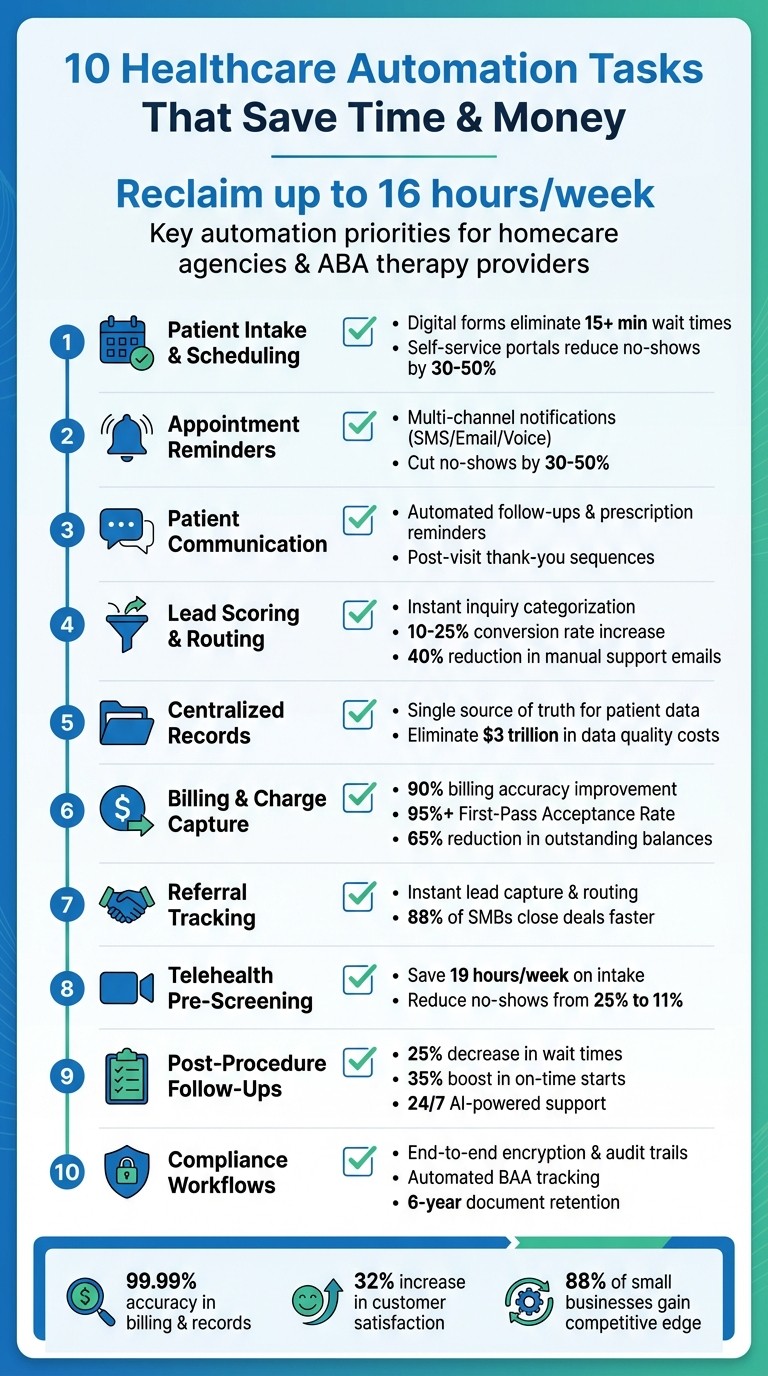
10 Essential Healthcare Automation Tasks for Small Businesses
Task 1: Automate Patient Intake and Appointment Scheduling
Small business owners spend up to 16 hours a week managing manual intake and scheduling tasks, a significant drain on time and resources [3]. For homecare agencies and ABA therapy providers juggling multiple patient requests, this process can slow onboarding and leave families waiting for essential answers.
Streamlining this begins with digital intake forms. These forms gather patient demographics, medical history, insurance details, and even e-signatures before the first appointment. By integrating directly with electronic health records, they eliminate the need for manual data entry and cut down average wait times by over 15 minutes [1][2]. This efficiency naturally extends to self-service scheduling, which simplifies the entire onboarding process.
With self-service scheduling portals, patients can book, reschedule, or cancel appointments anytime, day or night. Real-time calendar integration prevents double-bookings, while automated waitlist features instantly notify patients of open slots when cancellations occur [1][2]. These tools have been shown to lower no-show rates by 30% to 50% [5].
To get started, map out your current workflow. Track how many calls your front desk manages daily and pinpoint where paperwork is causing delays. Then, try a booking tool like Calendly or a website plugin that shows real-time availability. Platforms like Typeform or Google Forms can help with automatic patient categorization. For healthcare businesses, ensure you select secure, compliant tools that meet industry standards.
Interestingly, 88% of small business owners say automation gives them a competitive edge by freeing up time to focus on patient care [6].
Task 2: Set Up Automated Appointment Reminders
Missed appointments can drain revenue and waste valuable staff hours. Automated reminders tackle this issue by sending notifications through SMS, email, or voice messages - without requiring manual effort.
To minimize no-shows, adopt a multi-channel approach. Automate notifications across SMS, email, and voice to cater to patient preferences and boost response rates. Many scheduling tools, such as Calendly, Bookly, and SimplyBook, come with built-in reminder features. These systems automatically send reminders when an appointment is booked or as the date approaches.
If your business uses separate calendar and communication tools, integration platforms can bridge the gap. Tools like Zapier and IFTTT can sync your calendar with automated SMS reminders, ensuring messages are sent 24 hours before an appointment. These integrations can pull essential details - like meeting links, addresses, or preparation instructions - directly from your calendar, eliminating the need for manual updates.
Adding a one-click rescheduling option to your reminders can further streamline the process. This feature allows patients to adjust their appointments instantly, freeing up canceled slots for others.
For healthcare providers dealing with sensitive patient information, compliance is critical. Before choosing a reminder tool, verify that it provides a Business Associate Agreement (BAA) or explicitly states its HIPAA compliance in its security features. This ensures your system meets legal standards while protecting patient data.
Task 3: Automate Patient Communication Workflows
Keeping in touch with patients doesn’t have to mean endless hours spent on follow-up calls or manual check-ins. By building on automated scheduling and reminders, you can streamline communication workflows to minimize repetitive tasks and improve patient engagement. These workflows can take care of routine interactions - like sending post-visit thank-you notes, prescription refill reminders, or wellness check-ins - allowing your staff to focus on more complex responsibilities.
For example, you can automate post-visit follow-ups by sending a thank-you message immediately after an appointment. A week later, follow up automatically with a request for feedback or a testimonial. These sequences can be triggered directly from your scheduling system once a visit is marked as complete [5].
Prescription refills are another area where automation shines. Set up timely reminders so patients know when it’s time to request a refill. They can then contact your office or submit their request through your patient portal.
Tailor your communication channels to the type of message. Use SMS for urgent appointment reminders to grab attention quickly, and rely on email for more detailed information, like post-care instructions.
To put these strategies into action, explore automation tools specifically designed for healthcare workflows. Many of these tools offer no-code templates for tasks like rebooking reminders and follow-up sequences, making implementation straightforward.
Before diving in, though, it’s essential to ensure HIPAA compliance. Any tool handling Protected Health Information (PHI) must provide a Business Associate Agreement (BAA). For non-clinical outreach - like wellness newsletters or satisfaction surveys - stick to standard marketing platforms and keep these systems separate from those managing sensitive medical data. This helps maintain patient trust and safeguards their privacy.
Task 4: Automate Lead Scoring and Inquiry Routing
Not all patient inquiries are created equal. Some, like billing questions, can wait a bit longer, while others - like requests for immediate consultations - need urgent attention. This is where automated lead scoring steps in, instantly categorizing inquiries and directing them to the right team member.
Here’s how it works: when a patient fills out a form on your website, automation analyzes their responses and assigns a priority score. For example, questions about procedures, insurance coverage, or appointment availability help the system decide if the lead is “hot” and ready to book or simply gathering information. High-priority inquiries, such as those mentioning urgent symptoms or requesting immediate consultations, are routed straight to clinical staff. Meanwhile, less urgent matters, like billing questions, are sent to your admin team for follow-up [5][8].
This process doesn’t just save time - it speeds it up dramatically. Sorting inquiries manually can take hours or even days, but automated routing happens in seconds. Patients also receive an immediate acknowledgment message confirming their request has been received. This kind of quick response can make a big difference; studies show that adding auto-responses to form submissions can increase conversion rates by 10% to 25% [5].
Beyond speed, automation ensures no inquiry gets overlooked. It tracks every message and reduces the volume of manual support emails by up to 40% [4]. That means fewer missed opportunities and a more organized workflow.
To put this into action, start by setting up smart forms on your website. These forms should ask key qualifying questions, like the type of service needed, insurance details, preferred contact method, and urgency level. Then, connect these forms directly to your CRM, so the data flows in automatically - no manual entry required. From there, establish routing rules: telehealth inquiries go to virtual care coordinators, surgical questions to clinical leads, and billing issues to the admin team. Once the system is in place, it takes care of the rest, freeing up your team to focus on what they do best - caring for patients.
This automated approach not only improves response times but also fits seamlessly into a streamlined workflow, helping your team stay efficient and focused.
Task 5: Centralize Patient Records and Interactions
Scattered patient data across spreadsheets, emails, and apps can slow down communication and rack up unnecessary costs. Imagine this: a patient updates their phone number in one system, but it’s not reflected elsewhere. Follow-up calls get delayed, and care suffers. Poor data quality like this is no small issue - it’s estimated to cost the U.S. economy over $3 trillion every year [9].
A centralized system solves this by creating a single, accurate source of information. Appointment histories, billing statuses, and care notes are all stored in one place, giving staff instant access to up-to-date records [3]. So, when a patient calls with a question, your team can pull up their complete file in seconds, cutting down on delays. Plus, this setup works hand-in-hand with automated processes, making operations even smoother.
Repetitive tasks eat up time - small business owners lose up to 16 hours a week on them, and IT teams spend over half their time on administrative work [3]. Centralized automation tackles this issue by syncing data automatically. For example, when a patient fills out an intake form, their details are instantly updated across your CRM, billing system, and scheduling tools. No more duplicate entries, no more wasted hours.
These systems also help reduce errors from manual data entry and ensure compliance. Built-in monitoring features can flag potential regulatory issues before they become problems [3].
To get started, take stock of your current data sources - intake forms, scheduling tools, billing systems, and communication platforms. Then, choose an integrated system that works for your needs. Tools like Rippling can consolidate records, while platforms like Zapier or HubSpot’s free CRM can connect apps you already use. Begin with high-priority areas, such as syncing intake forms with your CRM, and expand from there [3][4].
Task 6: Automate Charge Capture and Billing
Relying on manual billing can seriously hurt your bottom line. Did you know that 50% of denied medical claims are never resubmitted? That’s money your practice will never see again [10]. Add to that the average human error rate of 4% in data entry, and you’ve got a recipe for frequent claim denials - each one costing time and money to resolve [14]. Manual processes like data entry and invoice reconciliation are a direct path to revenue loss.
This is where automated charge capture steps in to make a difference. By pulling service data directly from your Electronic Health Record (EHR), it generates charges instantly, ensuring no billing opportunities slip through the cracks. Running daily reconciliation reports can help catch any gaps before they turn into financial setbacks. By 2021, 78% of healthcare providers had already adopted or were implementing automation like this, with reported improvements in billing accuracy soaring to 90% [10].
Another key tool is claims scrubbing. Automated systems review claims before they even reach the insurance company, checking for coding errors, missing modifiers, or demographic mistakes. This proactive approach can significantly boost your First-Pass Acceptance Rate - aiming for 95% or higher is essential to avoid resubmission nightmares and keep cash flow steady [10]. Practices using Robotic Process Automation (RPA) have seen compliance improve by 92% and productivity jump by 86% [10].
Automation doesn’t just help with insurance claims - it also simplifies patient payments. 72% of patients say they’re more likely to pay right away when they receive a payment link via text or email [11]. Practices that adopted Text-to-Pay solutions saw outstanding balances drop by 65%, while reducing the time spent on collections by 30% [13]. Securely storing credit cards on PCI-compliant platforms allows you to process recurring payments effortlessly.
Task 7: Automate Referral Tracking and Coordination
When a referral contacts your practice, every second counts. Even a short delay - like waiting 30 minutes to respond - can reduce the likelihood of qualifying that lead by a staggering 21 times [17]. Relying on manual referral tracking can leave gaps where valuable opportunities slip through. Automation eliminates these gaps by instantly capturing every inquiry and directing it to the right team member. By centralizing referral handling, you can reduce delays and avoid missed chances.
Using a CRM like HubSpot [15] allows you to centralize referral data and track it from the moment it’s received, whether through a phone call, web form, or email. These platforms can automatically assign referrals based on factors like case type or urgency. To keep everyone on the same page, you can define pipeline stages - such as New Opportunity, Engaging, or Qualified - so your team knows exactly where each referral stands and what actions are needed [17]. For example, setting up an automated trigger to send a follow-up email after leaving a voicemail - saying something like, “I just left you a voicemail; I’ll follow up tomorrow if I don’t hear back” - can help maintain momentum [17].
Automation doesn’t just streamline tracking; it also speeds up clinical workflows, reducing treatment delays and keeping processes running smoothly. In fact, 88% of small and medium businesses report that automation helps them move faster and close more deals [19].
Beyond tracking, automation can also boost referral engagement. For instance, automated systems can send “ask for referral” emails to happy clients and issue rewards like gift cards or coupons once a referral hits a certain milestone. This makes it easy to motivate referrals and track rewards without extra effort [17][22][23].
For practices managing high call volumes or after-hours inquiries, AI-powered tools can be a game-changer. These systems capture details from after-hours referrals, sync them with your CRM, and trigger immediate follow-ups [20][21]. This ensures no referral gets overlooked, even when your front desk is closed. Plus, automation saves time on routine tasks - 69% of workers say it helps reduce wasted time, and 59% estimate saving over six hours a week by automating repetitive work [19].
Task 8: Use Automation for Telehealth Pre-Screening
Telehealth pre-screening takes patient intake for virtual visits to the next level by cutting down on manual processes and saving valuable time.
Before virtual appointments, teams often spend a lot of time gathering patient information like symptoms, insurance details, and medical history. On average, this manual process takes about 10 minutes per patient, adding up to as much as 19 hours every week [27]. By automating pre-screening, you can collect all the necessary details ahead of time, making the entire process quicker and more efficient.
Digital forms sent via email or text can gather key information, such as the reason for the visit, symptoms, and medical history. These forms sync directly with your Electronic Health Record (EHR) system [26][29]. To ensure accuracy, you can make critical fields mandatory, guaranteeing that no important details are missed during triage. Once the pre-screening is complete, automated workflows can immediately send patients the telehealth links and step-by-step technology guides, so they’re ready and confident to join their appointments.
For urgent situations, automation can go even further. Logic-based workflows can detect high-risk symptoms or urgent keywords, flagging these cases for immediate attention and routing them to a priority queue [29][7]. AI-powered tools, available 24/7, can handle common inquiries, provide instant responses, and qualify patient needs - even when your office is closed. This level of automation has been shown to reduce no-show rates from an average of 25% to just 11% [28].
"Automation isn't about replacing the human touch in healthcare. It's about giving your team more time to focus on what matters most - patient care."
Becky Whittaker, Healthcare Writer [27]
Task 9: Automate Post-Procedure Follow-Ups
Post-procedure follow-ups play a crucial role in patient recovery, but keeping track of every check-in, medication reminder, and recovery milestone can be overwhelming for your team. Automated systems simplify these tasks by managing recovery instructions, follow-up notes, and medication reminders for you [18][31]. These workflows are usually triggered by updates in your Electronic Health Record (EHR) or CRM - such as marking a procedure as complete - ensuring no patient slips through the cracks [18][30]. Real-world examples show how effective this can be.
In September 2025, Michael Zanetti, a partner at Erasable Med Spa, shared how the Nextech platform transformed their operations into what he described as a "well-oiled machine." The system automated every step of the patient journey, from initial consultations to post-procedure follow-ups, ensuring seamless recovery support for all patients [18]. Likewise, in October 2025, Community Care Clinic implemented an AI-driven system to handle tasks like patient intake forms, appointment reminders, and insurance verification. The results? A 25% decrease in waiting room times, an 18% reduction in operating costs, and a 35% boost in on-time appointment starts [31].
Multi-channel automation enables communication through the patient’s preferred method - whether that's SMS, email, or web portals [18][31]. AI tools also provide 24/7 responses to common questions, easing patient concerns and freeing up staff to focus on more complex cases. Plus, these systems maintain HIPAA compliance and prioritize data security [31].
To make the most of these strategies, integrate your automation tools with your EHR so follow-ups are triggered immediately after a procedure is logged [18][31]. Use behavior-based triggers to send personalized email or SMS sequences tailored to specific patient actions or recovery milestones. For example, automated messages like "Please remember to take your prescribed medication at 8 PM" can help improve adherence and engagement [30][31]. This ensures consistent follow-ups while reducing the risk of errors [18].
Task 10: Maintain Compliance with Automated Workflows
Incorporating automation into your operations can streamline tasks, but ensuring compliance is still essential, especially when it comes to protecting patient data. Automated workflows help maintain compliance by standardizing processes, tracking interactions, and reducing the likelihood of human error [35]. These workflows are designed to meet all regulatory requirements while seamlessly integrating into your broader automation strategy.
To safeguard data effectively, implement end-to-end encryption, role-based access controls, and automatic logging of PHI (Protected Health Information) [32][33]. End-to-end encryption ensures data remains secure during transmission and while stored in your database, preventing unauthorized access. Role-based access controls ensure that only authorized personnel - like your designated HIPAA Privacy or Security Officer - can view sensitive patient information [32][33]. Meanwhile, automatic logging creates a detailed audit trail for every interaction involving PHI, which is invaluable for compliance monitoring [34].
When using third-party automation tools, always confirm that a Business Associate Agreement (BAA) is in place. This agreement ensures the third party adheres to HIPAA regulations. Avoid using built-in forms from platforms like Wix, WordPress, or Webflow for collecting medical data unless they specifically offer a BAA. Instead, opt for HIPAA-compliant plugins or tools designed for handling sensitive information [33].
It's also critical to retain compliance-related documents, such as policies, risk assessments, and training records, for at least six years [36][38]. Automated workflows can simplify this by triggering reminders for employee training and sending updates when regulations change [32]. Moreover, your system should support breach notification requirements by automatically alerting you to any incidents and initiating procedures to notify affected individuals and the HHS Secretary within 60 days of a breach being discovered [32].
To further strengthen compliance, configure your automation to follow the "minimum necessary" rule, ensuring workflows access and share only the PHI required for a specific task [32]. Regularly assess risks and establish manual backups to mitigate the impact of any automation failures [35][37][38]. By combining technical safeguards, thorough documentation, and ongoing risk assessments, you can maintain compliance while easing the administrative workload.
How to Get Started with Automation
Now that you’ve got a sense of the types of tasks ripe for automation, let’s dive into how to get started.
Start by auditing your daily operations to pinpoint repetitive, time-consuming tasks. Research shows office workers lose hours each day to mundane administrative work [24]. Look for areas where employees manually transfer data between systems - these are prime candidates for automation. As Wren Noble from Zapier puts it, “Bridging software systems is a prime target for automation” [16].
Once you’ve identified potential workflows, begin with the low-hanging fruit - simple, high-frequency tasks like appointment reminders or lead intake. These are easier to automate and can deliver quick wins before you tackle more complex processes [24]. For example, document each task as a clear if-then rule, such as: “If a patient requests ABA therapy services, then send this specific intake form.” McKinsey Global Institute estimates that 69% of data processing and 64% of data collection activities could be automated, so focus on repetitive, rule-based tasks for maximum impact [12].
Next, test your automation in real-world scenarios. For instance, try running your automated workflows alongside manual processes for a week to identify any issues. Consider varied situations, like incomplete details or multiple service requests, to ensure the system performs as expected [39]. A great example of this approach is VEV, a Norwegian telecom company. In 2025, they piloted Agentforce 360 through Salesforce Foundations to automate customer support. During their trial, 30% of support cases were resolved automatically, and the speed of routing complex queries improved by 40% [40].
To streamline operations further, integrate automation tools with your CRM or EHR using APIs or native connectors. This centralizes your data and eliminates manual updates. Automating routine CRM tasks alone can save up to 15 hours a week [40]. Be sure to define measurable metrics to track your progress and fine-tune as needed [39].
Collaboration with your team is crucial. Talk to employees to identify the most frustrating, repetitive tasks - they often have insights you might overlook [12]. As Wren Noble wisely notes:
"Automation works best when it is driven by the needs of the people using it" [41].
When testing uncovers errors, address them one step at a time. Adjust the specific rule causing the issue, then monitor the results for a few days before making further changes [39]. Businesses that embrace this methodical approach have seen average cost savings of 20%, proving the value of starting small, testing thoroughly, and scaling based on clear results [12].
Conclusion
By automating the 10 tasks outlined above, small healthcare service providers can reclaim up to 16 hours each week and cut operational costs[12][25]. That’s time better spent on patient care, strategic initiatives, or simply reducing the stress of manual, repetitive work.
The benefits go beyond just saving time and money. Automation delivers an impressive 99.99% accuracy in critical areas like billing and record-keeping, significantly reducing the chances of human error[25]. It also enhances customer satisfaction by 32%[25]. Perhaps most striking, 88% of small businesses report that automation helps them compete on a level playing field with larger companies[24].
This checklist addresses specific operational pain points, showing how automation can transform everyday workflows. The best approach? Start small. Choose one repetitive, high-volume task - like appointment reminders or lead intake - and automate it. Test the process, measure its impact, and then move on to the next task. As Wren Noble from Zapier wisely notes:
"When human creativity is freed from mindless and repetitive busywork, your company will suddenly have a lot more energy for innovation, collaboration, and growth." [41]
Strategic automation not only lightens your team’s workload but also strengthens your business’s overall performance. Success today isn’t just about having the biggest budget - it’s about using tools like automation to work smarter, not harder.
FAQs
How can small healthcare businesses use automation to improve patient engagement?
Automation can transform how small healthcare practices interact with their patients, making the experience smoother and more patient-focused. For example, routine communications like appointment reminders, follow-up messages, or check-in prompts can be automated and sent via text - a channel with an impressive 98% open rate, far surpassing email. These messages can include key details such as appointment times, location, or required paperwork, and even let patients reschedule by simply replying. This approach not only reduces no-shows but also helps fill open slots and saves staff from spending hours on manual calls or emails.
Automation goes beyond reminders, too. With automated workflows, practices can send personalized follow-ups or educational materials tailored to a patient’s specific condition. This builds stronger connections, increases patient engagement, and fosters trust. By handling repetitive tasks, automation allows staff to focus more on delivering top-notch care. It’s a win-win: smoother operations for the practice and a better overall experience for patients.
How can I ensure compliance when automating tasks in my small business?
To stay compliant while incorporating automation into your operations, start by identifying the regulations relevant to your industry. For example, healthcare businesses must adhere to HIPAA, while other industries may need to follow state-specific privacy laws. Determine the types of data your automated workflows will handle and evaluate potential risks, such as data breaches or unauthorized access.
Opt for automation tools that come with strong security features like encryption, role-based access controls, and audit trails. Ensure the vendor’s privacy policies align with your compliance needs. It’s also important to document your setup process, maintain records of consent and agreements, and train your team to use the system in a way that meets compliance standards.
Once your automation system is running, keep a close eye on it. Regularly review logs to confirm that only authorized actions are taking place, and adjust your processes as regulations evolve. If you’re using third-party integrations, make sure to perform vendor risk assessments and include data protection clauses in your contracts. Lastly, establish a clear and actionable response plan to handle potential breaches swiftly and transparently.
What tasks should I automate first in my small business practice?
When introducing automation to your home care or ABA therapy practice, it's smart to start with tasks that immediately save time and boost efficiency. A great place to begin is with customer communication. Tools like auto-responders or chatbots can handle appointment requests, share updates, and answer frequently asked questions. This not only cuts down on endless email exchanges but also frees up your team to focus on delivering personalized care.
Another crucial area to automate is invoicing and payments. Set up systems to generate invoices right after services are provided, schedule recurring payments, and send polite reminders for overdue bills. This ensures smoother cash flow and spares you from those awkward follow-up conversations.
Lastly, streamline scheduling and appointment reminders by using calendar integrations. These tools can manage bookings, send confirmation messages, and reduce no-shows with timely reminders.
These straightforward automation steps are affordable, simple to put in place, and deliver quick results - laying a solid foundation for more advanced solutions as your practice evolves.